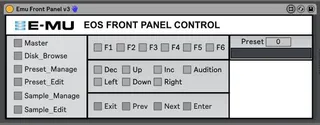
Emu Front Panel Control3
Provides control of most front panel buttons for Emu IV samp...
- Type
- MIDI Effect
- Author
- bcm70
- License
- AttributionNonCommercialShareAlike
- Live version
- 10.0.1
- Max version
- 8.0.0
- Downloads
- 264
- Updated
- 2018-05-22
Emu Front Panel Control3 is a MIDI Effect for Ableton Live by bcm70, distributed as Creative Commons Attribution-NonCommercial-ShareAlike. It targets Live 10.0.1 and Max 8.0.0. On maxforlive.com it has 264 downloads. First published 2018-05-19, last updated 2018-05-22. 21 user comments below.
New to Max for Live? Read what MIDI Effects do, what the AttributionNonCommercialShareAlike license means, how to install a device.
Description
Provides control of most front panel buttons for Emu IV samplers running EOS 4.0 or above. May work on earlier builds of EOS but hasn't been tested.
Comments (21)
Can't really open...I mean, I can't use it under Live, can't open it with Max 8 or Max 7...
Trying to use it as it should be, but can't insert it to Live at all, do not know why, first time that Live "rejects" a device.
Max 7 or 8 won't open it either...
So, can't really use it.
Can we talk VIA mail?
I'm really interested in this project as I love my old Ultra and would use it much more if I could "avoid" some of those encoder rolls :D
@FlowID - The device works off a combination of sysex (all the front panel buttons) and MIDI CC (preset change). I used the EOS 4.0 sysex document as the basis for the sysex calls. So if your machine is running that you should be fine. If it's running an earlier version of EOS it may or may not work. I don't have a machine with an earlier version of the operating system to check it on. So have a go. I'd be interested in knowing if it does work on older machines.
You need to set your sampler up as follows:
1. Push the Master button on the front of the sampler.
2. Press F6 to enter the MIDI page.
3. Press F1 to enter the Mode page.
4. Set the Basic Channel to 1.
5. Set the MIDI mode to omni.
6. Set the MIDI Device ID to 1.
7. Press the Master button again to save the changes.
Please keep up the good work!
http://maxforlive.com/library/device/4761/emu-control
2) Feature issue: The control panel does not allow selecting the ROM presets starting with L instead of P.
3) Bigger issue: The names of the Samples do not appear somehow it's not receiving SysMsg. receive SysMsg does not get triggered. Any idea? Who triggers SysMsg?
2) ROM presets are accessible by increasing the range of the live.numbox[1] under change preset from 0-999 to 0-1255. Assuming you have 256 presets in ROM. The ROM presets seem to start at 1000 on E-Synth so after the 999 possible RAM presets.
3) Still not receiving any SysMsg. There is a file SysMsg.amxd in your other project that probably needs to be included here and put on another track with IN monitoring and the Midi from set to the E-MU. However, sysexin does not seem to be triggerd.
sysexin to work requires upgrading Max for Live to the latest release (https://cycling74.com/downloads) and the point Live to the correct path in Albeton Lives preferences.
Let me know.