- Type
- Audio Effect
- Author
- Sanders
- Version
- 1.2
- License
- AttributionShareAlike
- Live version
- 10.0.2
- Max version
- 8.0.0
- Downloads
- 3,487
- Updated
- 2018-12-11
FFT Vocoder is an Audio Effect for Ableton Live by Sanders, distributed as Creative Commons Attribution-ShareAlike. It targets Live 10.0.2 and Max 8.0.0. On maxforlive.com it has 3,487 downloads. First published 2018-06-04, last updated 2018-12-11. 1 user comment below.
New to Max for Live? Read what Audio Effects do, what the AttributionShareAlike license means, how to install a device.
Description
With the advent of multi-channel routing capabilities in Ableton 10, I thought it was high time for a neat little FFT phase based vocoder. Simple, but very effective!
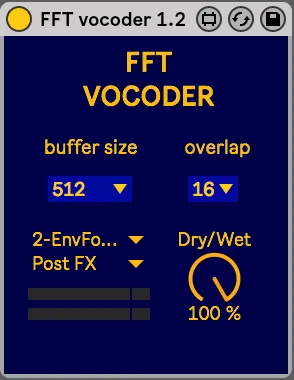
To set it up simply put it on the audio track to be 'vocoded' and select the carrier channel and insertion point. You can play around with the buffer size and overlap. Low buffer sizes and overlaps will make things more grainy and dirty, with a lower CPU load and a fast reaction time, while higher values will keep things crisp and crystal clear, but will demand more. The buffer size determines the amount of latency as well.
For those who care: I tried to keep to the m4l 8 standard as much as I could regarding the approach to wet/dry, audio routing and so on.
Hope you enjoy!
If you encounter a problem, have a question, or just want to say hi, you can find my contact details inside the device ;)
p.s.: IMPORTANT: this device will only work from Ableton 10/Max 8 onwards, as it uses the new routing system!
Update 1.1:
- fixed bug that prevented the parameters from loading up properly after saving and reloading a liveset.
- fixed tiny bug turning the volume sliders of each copy of the device to grey when one of them was deactivated
Update 1.2:
- changed name from "Phase Vocoder" to "FFT Vocoder": although it is a vocoder making use of the phase of FFT bins, an actual phase vocoder is a different thing altogether, and has a different use and functionality from a classic vocoder
- slightly less CPU-heavy, should be less prone to any crashes too
- fixed bug that could stop the device from working upon loading in a liveset until changing the buffersize or overlap parameters
Comments (1)