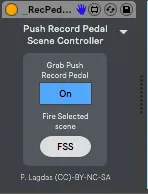
Push Record Pedal Scene Controller
This device grabs the record pedal control from push 2 and u...
- Type
- MIDI Effect
- Author
- Panosla
- Version
- 1.1
- License
- AttributionNonCommercialShareAlike
- Live version
- 10.0.2
- Max version
- 8
- Downloads
- 380
- Updated
- 2018-07-28
Push Record Pedal Scene Controller is a MIDI Effect for Ableton Live by Panosla, distributed as Creative Commons Attribution-NonCommercial-ShareAlike. It targets Live 10.0.2 and Max 8. On maxforlive.com it has 380 downloads. First published 2018-07-22, last updated 2018-07-28. 2 user comments below.
New to Max for Live? Read what MIDI Effects do, what the AttributionNonCommercialShareAlike license means, how to install a device.
Description
This device grabs the record pedal control from push 2 and uses it to launch next scene (tap once on the foot controller) or previous scene (by tapping twice on the foot controller).
The controls are just two:
Grab Push 2 Record Pedal - When this is active the pedal stops to control the default record function and controls scene launching. When is inactive reverts to its original function
Double Tap Interval - This is just a preference. It controls the time interval that two taps would register as a double tap.
How to use:
Simply load it on a midi track.
Changes in v1.1
- Added a FSS button (which stands for Fire Selected Scene)
- Removed some of the non essential from the UI and added a preferences triangle
- Added compatibility for Push 1 (Check Preferences section)
Comments (2)
However, is there any way to launch the selected scene and not only "launch from the previous scene" ? I find it kinda confusing to select the scene before the one you really want to launch.
Thank you for this amazing little add-on !!
Is there any way to assign the FSS to the footswitch pedal ?
Also, would it possible to deactivate the Double Tap function ?
Thank you very much Panosla !