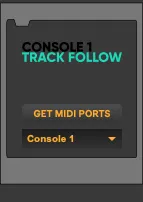
Console 1 Track Follow
Console 1 Track Follow Device :) I like using Softube...
- Type
- Audio Effect
- Author
- Airyck
- Version
- 1.1
- License
- AttributionShareAlike
- Live version
- 10.0.6
- Max version
- 8.0.2
- Downloads
- 446
- Updated
- 2019-02-10
Console 1 Track Follow is an Audio Effect for Ableton Live by Airyck, distributed as Creative Commons Attribution-ShareAlike. It targets Live 10.0.6 and Max 8.0.2. On maxforlive.com it has 446 downloads. First published 2018-10-18, last updated 2019-02-10. 13 user comments below.
New to Max for Live? Read what Audio Effects do, what the AttributionShareAlike license means, how to install a device.
Description
Console 1 Track Follow Device :)
I like using Softube Console 1 when I do my final mix but unfortunately Ableton Live doesn't support track follow for the Console 1.
Ableton Live supports:
*Automatic Track Number
*Automatic Track Name
This device allows limited track follow for Ableton Live and Console 1.
"Console 1 Track Follow" allows Ableton Live to follow Console 1 but Console 1 will "NOT" follow Ableton Live.
**New 1.1 Update Features**
*Master track is now selectable from the Console 1 controller.
*Any number of return tracks (within Ableton Live's own limits) are now selectable from the Console 1 controller.
*Uses imp.midi and imp.sysex externals to bypass all of the previous MIDI setup complications. Just drop Console 1 Track Follow on the Master track, verify Console 1 MIDI port is selected, and you are ready to go!
The externals are cross platform but I have not tested on Windows as of now.
*Attempts to set the MIDI port automatically to Console 1 MIDI port. Get MIDI Ports and drop down menu for manual selection if needed.
**FEATURES from 1.0**
*Select track buttons on Console 1 hardware controller will select the corresponding Ableton Live track Number
*Page up and down buttons will let you select more than 20 tracks in Ableton Live (up to 1000 pages can be selected).
*Shift button on hardware temporarily disconnects the Select Track buttons to allow you to choose shift settings or load other channel strips without accidentally changing the track.
** How to use it:
Make Sure every track in Ableton Live is named:
"# Track name"
This makes sure the track gets an automatic number.
Add Console 1 plugins to every Instrument/Audio /Return/Master Track.
Now when you select a track from the Console 1 controller, Ableton Live will follow the track selection!
Ableton Live MIDI Preferences:
*No MIDI preferences changes required as of v1.1. Just leave all Console 1 MIDI preferences set to "off"(Track, Remote, Sync).
Drop 1 instance of Console 1 Track Follow on the Master track (or any Audio track).
You should see "Console 1" selected as the MIDI port on the Console 1 Track Follow device. If you don't you can press the "GET MIDI PORTS" button to fill the drop down menu with your MIDI ports. Choose "Console 1" from the list.
**Planned/Attempted Future Features**
* Fix issue of Navigating OSD menus with the page up/down buttons
* Other things I can't think of right now that "are" possible with limited Softube Support.
**KNOWN ISSUES**
*Tracks can be selected regardless of whether or not there is a Console 1 plugin on the track (more of a feature than an issue to me).
*Because of the page up and down functionality the page up and down buttons cannot be used to select new menu devices such as channel strips or settings options. --Use the Volume/Select Knob instead.
*Control is only one way because of limited information from Softube. The physical controls send SysEx data (which is how I was able to tap into the controls) but communication is with the plugin(s) and hardware are done through some sort of local network communication. I'm not sure if I can hack it to work like the "supported" DAW's can so just assume this is all the functionality you get for now (Until Ableton decides to officially support it).
**Tips regarding known issues out of my control**
*If you add more return tracks after you have loaded your Console 1 plugins, the order of the return tracks may be incorrect. To fix this you can use the "...Rearrange Tracks" functionality in the Console 1 controller settings menu. This is due to the fact that Ableton Live return tracks are Letter vs. Numbers (a problem of incompatibility between Softube and Ableton's Return Tracks letter scheme).
A good workflow is to add all of the return tracks you might need before adding all of your console 1 plugins.
*(Console 1 bug work around) If you use the ...Rearrange Tracks functionality and try to "swap tracks" from the Console 1 controller it will cause the Softube Console 1 app to crash. The workaround is to move the track you want to replace to an empty location and move the new track to the new empty location that you just created. Basically don't try to move the track right on top of an existing one when rearranging. tracks from the controller.
Please let me know if you find other bugs and if anything isn't working for you. I'm only able to test with my single controller and on OSX as of now.
Comments (13)
Somehow I can't get it to work on:
OSX 10.12.6, Ableton 10.0.5, Console1 as AU
Your plugin in on a midi channel, it's on IN and Midi From is on Console1.
I can see from the blinking MIDI TRACK IN INDICATOR (top right) that Ableton registers the Midi from the hardware, but nothing happens in Ableton.
Any Idea?
Thanks
D
I plan to release an update soon that uses an external to bypass all of the MIDI setup. The update also has any number of return tracks and master track selection implemented. I just have to clean it up and pack everything.
My bigger hope would be getting info from Softube so I could do a full integration. Not sure that’s even possible though.
If anybody has this working on their setup I’d appreciate if you’d let me know. I have no way of knowing (testing)if the sysex varies from unit to unit.
Is this possible at some point: 'Console 1 will "NOT" follow Ableton Live.' Or is that by design or not just possible?
Also, this seems like a feature, "Tracks can be selected regardless of whether or not there is a Console 1 plugin on the track."
Now that I'm seeing some confirmed reports of it working for others I'll start working on the finished update. It's already working so I just need to clean up some things. I was working on a bunch of unrelated projects at my house and hadn't gotten back around here until now. I'll do my best to get the update posted this week.
@atzerodt
It may be possible eventually but Softube hasn't released any information to use. From the hacking and monitoring around I've done it looks like the information is sent over a local network connection. Even the Sysex is confusing because it's always changing. I think the data may be encrypted by Softube and could explain why it's always changing on every press of a key. I just got lucky and noticed that one bit of the Sysex data didn't change and was unique to each button press. This is how I was able to hack this together. The rest is just creative use of Max for Live to get it to work. If I figure it out communicating with the Console 1 controller I'll post it here right away.
I think I may have had this happen to me too. I'll try to find the bug and put a fix in an update after I release the new version.
It's been a bit but I may have just unplugged the controller and plugged it back in to get it working again.
The update includes the return channels and the master channel as well :)
I did some more tinkering and watching signals to the "Console 1"
on-screen display app. Really no new information to be shared about the communication to and from the app unfortunately; I still think the information is encrypted. If you find out anything more please let me know.
As of 1.1 the controller does everything "to" Ableton Live that the official supported control does (when using the AU version of the plugin). It's just not bi-directional (Ableton Live doesn't update the console 1 controller).
I have some ideas to add functionality to the controller that doesn't exist with the official control.
Things like:
Jumping around the arrangement with markers.
Possibly typing in numerical data to move to certain positions using the track numbers as a keypad.
I was also thinking of making a second application that allows you to use only Ableton Live plugins (or some select 3rd party VST's like Fabfilter stuff) instead of Console 1 plugins. Though this would probably be a different Max device.
I have a lot of Max projects/ideas in the works but, if you have more ideas for the Console 1 track follow let me know and I'll try to add them if they make sense.
I was going to add Volume/Pan/Send potentially but it’s being officially supported now. I’ll leave this up for people still on Live 9 or those who don’t want to update Live.