- Type
- Audio Effect
- Author
- MusicWithMachines
- Version
- 0.8
- License
- None
- Live version
- 10.0.1
- Max version
- 8.0
- Downloads
- 3,536
- Updated
- 2018-10-24
mwm.MODMIX is an Audio Effect for Ableton Live by MusicWithMachines, distributed as freeware, with no license specified by the author. It targets Live 10.0.1 and Max 8.0. On maxforlive.com it has 3,536 downloads. Published 2018-10-24. 3 user comments below.
New to Max for Live? Read what Audio Effects do, how device licenses work, how to install a device.
Description
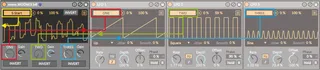
Create complex modulations by mixing up to three modulation sources from other Max For Live devices like LFOs and Envelope Followers.
HOW TO:
Map modulators to the three dials ONE, TWO and THREE.
Adjust the gain of the three sources
Use INVERT to invert the three sources and the mix.
Map the result to a target by first clicking the “Map” button and then the target parameter.
Open the drop down menu on the top right to map seven more targets. Change the modulation amount with the two number boxes.
FOR LIVE 9 USERS: The device has a few visual glitches which don’t affect the functionality.
Comments (3)