mwm.Trigger Notes
Turn any modulation into Midi Notes in four different ways....
- Type
- MIDI Effect
- Author
- MusicWithMachines
- Version
- 0.2
- License
- None
- Live version
- 10.0.1
- Max version
- 8.1.0
- Downloads
- 807
- Updated
- 2021-09-05
mwm.Trigger Notes is a MIDI Effect for Ableton Live by MusicWithMachines, distributed as freeware, with no license specified by the author. It targets Live 10.0.1 and Max 8.1.0. On maxforlive.com it has 807 downloads. First published 2019-10-06, last updated 2021-09-05. 3 user comments below.
New to Max for Live? Read what MIDI Effects do, how device licenses work, how to install a device.
Description
Turn any modulation into Midi Notes in four different ways.
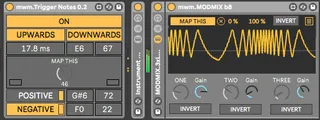
Functions from top left to bottom right:
ON: Lets the incoming modulation through.
UPWARDS: Triggers a note at zero crossing when control signal is increasing.
DOWNWARDS: Triggers note at zero crossing when control signal is decreasing.
DURATION (10-1000ms), PITCH, VELOCITY: Sets outgoing note parameters triggered by DOWNWARDS and UPWARDS.
MAP THIS: Map the control signal to this dial.
LEDs on the left and right turn yellow as long as Midi notes from UPWARDS and DOWNWARDS are on.
POSITIVE: Plays a note as long as the control signal is above the centre line.
POSITIVE LED: Indicates a note is triggered. If POSITIVE is switched off while a note is playing you create a sustained note and the LED stays yellow. Click on the LED to turn off the sustained note.
POSITIVE PITCH: Set the pitch of the POSITIVE note.
POSITIVE VELOCITY: Set the velocity of the POSITIVE note.
NEGATIVE: Plays a note as long as the control signal is below the centre line.
NEGATIVE LED: Indicates a note is triggered. If NEGATIVE is switched off while a note is playing you create a sustained note and the LED stays yellow. Click on the LED to turn off the sustained note.
NEGATIVE PITCH: Set the pitch of the NEGATIVE note.
NEGATIVE VELOCITY: Set the velocity of the NEGATIVE note.
To record the outgoing MIDI notes grab them on a separate MIDI track (see screenshot).
Demo video:
https://www.facebook.com/musicwithmachines.org/posts/10159511709152293
Comments (3)