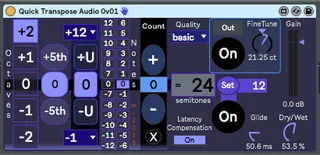
Quick Transpose Audio BW
A user-requested, 'single click' audio pitch transposer wi...
- Type
- Audio Effect
- Author
- synthesizerwriter
- Version
- 0.03
- License
- None
- Live version
- 10.0.5
- Max version
- 8.0.0
- Downloads
- 982
- Updated
- 2020-04-25
Quick Transpose Audio BW is an Audio Effect for Ableton Live by synthesizerwriter, distributed as freeware, with no license specified by the author. It targets Live 10.0.5 and Max 8.0.0. On maxforlive.com it has 982 downloads. First published 2018-11-01, last updated 2020-04-25. 2 user comments below.
New to Max for Live? Read what Audio Effects do, how device licenses work, how to install a device.
Description
A user-requested, 'single click' audio pitch transposer with the inceasingly-classic 'over-the-top' user interface!
This takes the MIDI pitch transposer user interface from 'Quick Transpose BW', and applies it to the Max 'Simple Pitch Shifter' example device. What this produces is something which kind of looks like 'Quick Transpose BW', but which has also lots more audio processing and live performance features. So there's nothing ground-breaking here - just a wild interface over a pitch shifter...
Unlike the MIDI pitch transposer, this one automatically comes with much higher levels of various audio artefacts because of the vicissitudes/challenges/difficulties of implementing audio pitch shifting, but these can definitely be used creatively!
The pitch shifter itself is surrounded by limiters, and so overdriving will change the timbre and flatten your dynamics (not always good!).
The 'FineTune' rotary control can be used to apply 'chorus'-type effects when the 'Mix' rotary control is around 50%, and there's an 'In/Out' button and an associated DJ-style 'On' trigger button for live performance use...
The transposition can also be stored using the 'Set' button, and then triggered live, again with a DJ-style 'On' button. Both of these performance buttons can be mapped to - an LFO for example, and there's a video of this here: https://youtu.be/-tRBavWkuoc
Having 'single click' quantised-pitch buttons to select pitch transposition means that you can easily cut the effect in and out (a setting of '0' is 'no transpose'...), and so you can do this in live performance (via the mouse = my fave) or automate it in various ways (LFO, Automation track, Macro Control...).
I have used this type of effect as an accent for drums, pads and for leads - imho there's no such thing as a 'standard way to use an effect'. So get your 'what happens if I do this?' mindset engaged and have fun!
This version adds in an extra button that allows the 'Count' to be quickly returned to zero. - just click on the transpose box in between the + and - buttons.
version 0.03 adds dedicated -1, +1, +4, and +5 buttons for bbedar.
Comments (2)
Down 1 step
Up 1 step
Up to the 4th
Up to the 5th
I am a total n00b to max4live, and not very proficient at programming. What I want to do is set 4 mappable (on) buttons like you have here, but each one will bring the progression to a different root note position. My sets are complicated with a lot of tracks, so they're pretty much all mixed down to audio, or this would probably be easier using a pitch shifter.
So far this is the closest I've come to finding a max4live device that will do what I want it to. Maybe you could help me design a device that does this I, IV, V jazz standard pitch jump I'm looking for.