ASD Performance Note Repeater
ASD is a three-channel note repeater that can be played live...
- Type
- MIDI Effect
- Author
- cvolm
- Version
- 1.0
- License
- None
- Live version
- 10.0.1
- Max version
- 7.3.5
- Downloads
- 1,550
- Updated
- 2018-12-21
ASD Performance Note Repeater is a MIDI Effect for Ableton Live by cvolm, distributed as freeware, with no license specified by the author. It targets Live 10.0.1 and Max 7.3.5. On maxforlive.com it has 1,550 downloads. First published 2018-11-22, last updated 2018-12-21. 3 user comments below.
New to Max for Live? Read what MIDI Effects do, how device licenses work, how to install a device.
Description
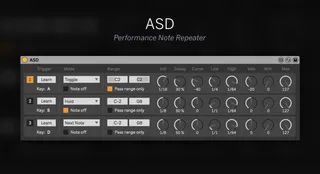
ASD is a three-channel note repeater that can be played live by triggering repeats on each channel with your A, S and D keys. Different trigger modes, note filtering and repeating settings like exponential or logarithmic trails give you a wide range of options to mess up your MIDI data in creative ways.
Features:
- Three channels of note repeating, each triggered by key press
- Select different trigger modes and note-off behaviors
- Define a note range or individual note to be repeated for each channel
- For each channel set the initial note value and decay of the repeats
- Define the speed increase and decrease of repeats with an exponential or logarithmic curve between a lowest and highest note value
- Increase or decrease velocity during the repeats within a defined velocity range
Note: Each channel works monophonic, it repeats one note per channel at a time. If you want to use it with a drum machine, where you have multiple hits at the same time, make sure to set the note ranges to the individual drums that you want to be affected.
And: In Ableton a device only detects key presses when it's currently focused. So make sure to once click anywhere inside of the device area.
Comments (3)