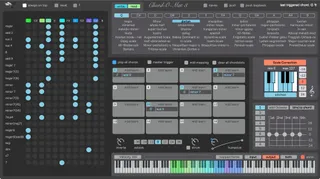
Chord-O-Mat
Chord-O-Mat 3 is a Max for Live Chord Library and Trigger De...
- Type
- MIDI Effect
- Author
- lqud
- Version
- 3.3
- License
- Commercial
- Live version
- 10
- Max version
- 8.1
- Downloads
- 1
- Updated
- 2023-12-23
Chord-O-Mat is a MIDI Effect for Ableton Live by lqud, distributed as a commercial (paid) device. It targets Live 10 and Max 8.1. On maxforlive.com it has 1 downloads. First published 2018-11-21, last updated 2023-12-23. 7 user comments below.
New to Max for Live? Read what MIDI Effects do, what the Commercial license means, how to install a device.
Description
Chord-O-Mat 3 is a Max for Live Chord Library and Trigger Device for Ableton Live 10 with Push integration.
It’s designed to have quick access to the chords in a Scale, to explore Chords, make chord progressions and play Live.
With the Instant Scale Device you’re able to make harmony changes over your whole Live Project. The Instant Scale Device is MPE compatible
Features of Chord-O-Mat 3:
- More than 40 Scales
- All Scales from Push 1, 2 & 3.
- Shows all Chords from the selected Scale.
- Automatically maps all chords to your Keyboard, so you're able to Trigger a chord with one key.
- create Custom Chord Sets
- make Chord Progressions with your Midiclips.
- clear User Interface.
- Strumming.
- Octave Designer to add or remove Notes from a chord
- integration of Push 1 & Push 2
- min. System Requirements: Ableton Live 10 / Max for Live 8
- Scaleable GUI (since Version 3.0.6)
Version 3.3. brings Push 3 Compatibility
check the Video here:
https://youtu.be/_3sblXiLrLk
https://youtu.be/bv4zCUZsCu4
https://youtu.be/o2rx32poMFc
Comments (7)
I'd really like the option to view the roman numerals for the chords. I like to orientate myself around functional harmony and when i can only see the Chord Names with note names i always have to recount which index this chord was relative to the tonic.
why not just stack the choices in lines from bottom row to top row or top to bottom? just not this snail house thing =)
otherwise i appreciate the hard work. its a great device. :)