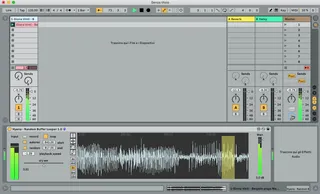
Hyena - Random Buffer Looper
live buffer recorder\looper with random playback speed, pos...
- Type
- MIDI Effect
- Author
- hyena
- Version
- 1.0
- License
- AttributionShareAlike
- Live version
- 10.0.1
- Max version
- 7.3.5
- Downloads
- 1,162
- Updated
- 2018-12-13
Hyena - Random Buffer Looper is a MIDI Effect for Ableton Live by hyena, distributed as Creative Commons Attribution-ShareAlike. It targets Live 10.0.1 and Max 7.3.5. On maxforlive.com it has 1,162 downloads. First published 2018-12-12, last updated 2018-12-13. 4 user comments below.
New to Max for Live? Read what MIDI Effects do, what the AttributionShareAlike license means, how to install a device.
Description
live buffer recorder\looper with random playback speed, position and loop length.
hit record to fill the buffer, then set playback speed and use the graphic tools to loop what you want from the visualized waveform.
hit random for madness! the random function is clocked, you can choose various time divisions.
now features optimized mc. objects and autosampling. almost all parameters are now automation and midi friendly :)
Comments (4)
2.) make the playback window MIDI mappable, set a CC for the width and a CC for the position. That way you could map these to a couple of LFO's, and create some interesting movement.
3.) When you hit Random, have a "Lock Playrate" check so that it's still random, but still musical, if you've recorded in a tonal loop and you want glitch, but not harmonic dissonance.
4.) maybe a min/max range for the random setting? I'm seeing alot of full width of the buffer selections, which are kind of useless for even 4n settings.
thanks for your feedback!
as of now i love clicks! i will perhaps add an optional envelope for declicking tho!
you can now automate position and width using the small live number boxes (start and end) if you don't use random.
mmm i'll think about numbers 3 and 4 anyway thanks for your suggestions and please have a look at new version 1.0 which adds autorecording and makes time division automation friendly :)
I love the idea of your plugin.
For the specific work I do: Is there a possibility to build in a drag and drop feature so that I can pull the loops out of the live looper and drop them as a clip to channel?
Best regards,
Rufus
i'm not yet very fluent with max but i'll test some ways to accomplish that! thanks for the input!