a better search for max devices
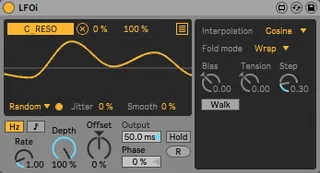
LFOi screenshot

LFOi

by mganss

LFOi is another fork of Live's LFO device. It adds more opt...

View on maxforlive.com

Type
Audio Effect
Author
mganss
Version
1.2.2
License
None
Live version
10.0.5
Max version
8.0.0
Downloads
6,837
Updated
2020-06-18

Description

LFOi is another fork of Live's LFO device. It adds more options to the random mode:

- Interpolation modes: Linear, Cosine, Cubic, Spline, Hermite (courtesy of the wave~ object)

- Random walk mode with configurable step size

- Fold modes clip, wrap, and fold for random walk (pong~ object)

- Configurable output rate (downsampling) for lower CPU usage

- Additional steps for beat-synced rate (stolen from LFO10 by Lokua ;)

The bias and tension parameters are only relevant when the Hermite interpolation mode is selected.

The step size parameter is only relevant when random walk mode is selected.

In random walk mode, successive random values are either a step up or down from the previous value or stay the same, e.g. if the current value is 0.5 and step size is 0.1, the next value will be either 0.4, 0.5, or 0.6.

Fold mode selects what happens in random walk mode if the value exceeds the range: In clip mode the value will be set to either the max or min value (e.g. if the next value would be 1.1, it will be set to 1.0). In fold mode, the value will be "folded back" into the range of valid values (e.g. if the next value would be 1.1, it will be set to 0.9). In wrap mode, the value will wrap around (e.g. if the next value would be 1.1, it will be set to 0.1).

Comments (18)

  • mastaman · December 22 2018
    this thing just destroyed my download directory...it moves files around to new directories..my whole current download directory is scrambled 1000 files moved form their original directory to some "patches " code" "data"..etc directories. if you are going to install this, by dragging the .amxd file to ableton...do it from a empty directory.
  • mastaman · December 22 2018
    268GB of data scrambled now in my download folder...months in time lost..take this thing down now and fix it FFS. So no one else does this.
  • mganss · December 22 2018
    Sorry, fixed in version 1.1. Max seems to do this automatically when the project setting "Keep project folder organized" is enabled.
  • telkmx · December 26 2018
    Wow what the fuck happened ?
    Did it moved every max patch to my download folder ?
    Did it copied them ?
  • mganss · December 27 2018
    @telkmx Did you use v1.1? If so, can you provide steps to repro?
  • mastaman · December 28 2018
    seems to work now in the new version 1.1. (only tested running it from a temp directory with a few filetypes this time) What happened to me was that every file in my download directory was "reorganized" ....now all my mp3's (that previously where in folders with the name of the artist) are in one big folder together with bassdrum samples and snaredrum samples in one new directory in my download folder...this happened after i ran version 1.0..but it seems to be fixed now...seems to be a "feature" in max4live as mganss explained with the "keep files organized" thing. I used to just drag and drop max4live files info my ableton project right from the download directory...now i copy them to a separate folder first just in case.
    cool random feature on this LFO...would be even cooler if the setup for the random LFO was on a "flip-out" page so that we could still see the oscilloscope when changing modes and interpolation.
  • newmodernscience · January 03 2019
    oh shit, THAT'S what happened. Yeah, bad on me for not sorting my Downloads folder as often, but this REALLY tore apart my Downloads folder.
    And no, there's no way to put it all back UGH. What a mess.
  • b60231 · February 05 2019
    Version 1.1 works fantastically - I would second the comment above regarding a UI that allows for more information when using the random mode.
    Could you also explain the different parameters in random mode?
  • hatyn · February 27 2019
    if a parameter is mapped to an ableton instrument, transport is running, LFO is on a random waveform, you can hardcrash ableton consistently by deleting the m4l device.
  • mganss · April 14 2019
    The settings for random mode now flip out to the side in v1.2 (click the little dot next to Random to toggle settings).
    @hatyn I can't repro. Which version of Live are you using? Can you provide steps to repro (preferably based on a fresh set)?
  • hatyn · February 26 2020
    @mganss It has been a while but I can't reproduce it either..will keep an eye out, maybe it got fixed or was another reason for the crashes when deleting the device.
  • jzjzjz · June 08 2020
    Awesome device mganss! Love the random walk feature.
    But it does indeed copy files it uses (to the downloads folder in this case), being the icons it uses, MapButton.maxpat, multimap, Advanced Settings.maxpat... Not sure to install the device to my MaxForLive folder, afraid of the trouble it might bring.
    I'm using Max 8.1.3, and the latest Ableton, 10.1.14. How can I help with a repro?
  • mganss · June 18 2020
    @jzjzjz I think I now fully understand what caused the problem in the first place. It was the "Development Path Type" setting which was set to "relative to device". I've set it to "disabled" in v1.2.2. The "Keep project folder" organized should be harmless now, but I've still kept it disabled.
  • monono · June 29 2020
    Hi @mganss, thanks for a great plugin!
    I have a feeling some of the subcurves seem to be misbehaving. For example, there seems to be an excess of sharp "v shaped" blips on the otherwise smooth spline curve. It feels like it may be a bug in your code. Perhaps one of your spline points has a incorrect +/-?
  • mganss · July 01 2020
    @monono Can you post steps to repro?
  • telkmx · March 25 2023
    Anyone knows if its not buggy anymore ?
  • orangetab · January 02 2024
    Is there a way to make the LFO unipolar?
  • mganss · January 03 2024
    @orangetab You can either adjust the Min/Max values at the top or the combination of Depth and Offset. For a parameter that has a range of -100 to +100, adjust the depth to 50% and offset to 50% in order to make the parameter go from 0 to +100.

← Back to search