- Type
- MIDI Effect
- Author
- mganss
- Version
- 1.5.1
- License
- None
- Live version
- 11.2
- Max version
- 8.5.1
- Downloads
- 33,745
- Updated
- 2023-01-25
Aicd is a MIDI Effect for Ableton Live by mganss, distributed as freeware, with no license specified by the author. It targets Live 11.2 and Max 8.5.1. On maxforlive.com it has 33,745 downloads. First published 2018-12-20, last updated 2023-01-25. 35 user comments below.
New to Max for Live? Read what MIDI Effects do, how device licenses work, how to install a device.
Description
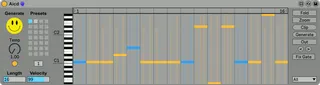
Aicd is an acid pattern MIDI generator Max for Live device based on a maximum likelihood n-gram model. More info at the GitHub repo (see link below).
Demo at https://youtu.be/y58dpdHuVms
v1.1: Add clip creation
v1.2: Add separate, MIDI mappable generate button
v1.3: Add output clip, play toggle
v1.3.1: Add MIDI thru
v1.4: Add pattern rotation
v1.4.1: Add MIDI mappable preset recall
v1.5: Update for Live 11
v1.5.1: Fix step calculation bug
Comments (35)
Would love it tho if the generated patterns didn't fill up Live's Undo History.
Also quick bug report? It seems to always start in the middle of the pattern for me, which can make syncing it kind of a pain, at least when I'm recording and trying to find 1 in the pattern again :)
@broah Thanks! I'll check if I can make it configurable. I want to keep a way to go back to a previous pattern, though.
Thank you so much xx
And what extra feature I would love to have there? Possibility to set octave range for a 1/X part of the loop and then distance of "offshoots", also in octaves. Like, say, 75% of the notes will be between C1 and C3, the remaining 25% will randomly jump 2 more octaves away, or just up in this case, that would be cool. You know, like breeding AICD with the Random device. :)
Aaaaaaanyway, thanks once again, keep the great job up.
(drumgen is friggin cool as well!!!)
Q - What does the Temp knob do? Can't seem to figure it out.
The feature I'd like to see is a way to "shift" a pattern left or right. Sometimes, a more interesting pattern will be generated that doesn't start on 1, especially if you listen to it without a beat/metronome. I can do this by capturing the MIDI into a clip and shifting things around but it'd be much easier if the plugin had a way of shifting the sequence left right with a button or two. Thanks.
@pizu123 Temp stands for temperature and increases the randomness. The shift feature is a good idea and probably easy to add thanks to the live.step object. I'll do it in the next couple of days.
The gate values are also part of the model and I'd like not to add complexity to it. One way to achieve something similar manually is by enabling "Fix gate" and then add the Mute Sequencer device (https://www.maxforlive.com/library/device.php?id=450)
Small question, I cant figure out how to export the created MIDI part to other MIDI track.
Thanks again
Lets say I made a MIDI program Im happy with and would like to use the MIDI on the channel Im in. Can I do it? Thank you again
Another option is to use the Out clip feature: Create an empty clip in the same track as the device, select that new clip and then click "Out" on the device. Now whenever you generate a new sequence the device will fill that clip with the corresponding MIDI notes. You can play the clip and still generate new sequences. This is especially useful if you want to apply a groove to the clip. To prevent double output click the small yellow circle button on the left hand side of the device to disable MIDI output from the device itself.
Thanks a lot anyway :)
Good enough for me, thanks :)
if you group de device into a group, the clip button does not work anymore. it does not create clips, just adds an empty scene.
once you group it, it works again.
https://ibb.co/TbXQvVG
I can't seem to get this to work on Ableton 11.1 on OSX 12.1. I get the error: "This device is not available in this version of Live". Any idea what's up? Thanks.
Def an issue with it though as someone else has pointed out, but let me add some more details for you.7
Works fine with 8 steps and 16. But when you use other strep lengths the sequencer changes start position depending on step you have chosen.
Also sequencer glitches out when 6 steps length is chosen and randomly resets to step one before finishing sequence. easy to see on test, happens after about 15 secs
PLEASE fix as I love this !
1) The locator bars on top does not work.
No matter how i set the locators the plugin keeps playing from step 1.
When i draw the locator bars i.e. between step 7 and 11 (4 steps) the plugin keeps playing step 1 to 4 (4 steps) while it should play the notes, velocity, slide, gate data from step 7 up to step 11.
2) The "generate" button on the right keep randomizing all parameters (pitch, velocity, slide and gate.
The "generate" button on the right in this way has 100% the same purpose as the smiley face on the left.
See screenshots:
https://i.imgur.com/bvsXSkk.png
https://i.imgur.com/DYWn0oi.png
Great plugin Michael