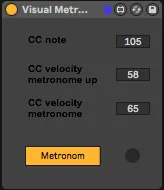
Midi Visual Metronome
This device let's you see the metronome counts on a midi co...
- Type
- MIDI Effect
- Author
- vargaradu
- Version
- 1.0
- License
- AttributionNonCommercialShareAlike
- Live version
- 10.0.3
- Max version
- 8
- Downloads
- 479
- Updated
- No Updates
Midi Visual Metronome is a MIDI Effect for Ableton Live by vargaradu, distributed as Creative Commons Attribution-NonCommercial-ShareAlike. It targets Live 10.0.3 and Max 8. On maxforlive.com it has 479 downloads. Published 2019-02-03. 1 user comment below.
New to Max for Live? Read what MIDI Effects do, what the AttributionNonCommercialShareAlike license means, how to install a device.
Description
This device let's you see the metronome counts on a midi controller! Basically you can see the metronome on a light enabled midi button on your controller.
Firstly, you will have to get informed about your midi controller's midi codes, i.e. the midi number and channel.
Usually each velocity is a different colour. Experiment with different colour values to see what you get!
Example: CC 105, Channel 6, Color 58.
Usage:
- create a new midi track
- set the output to the midi controller of your choice (make sure you have 'Track' set to 'ON' on the midi output settings in Live)
- choose the midi channel you want to send on
- place the device in this track
- choose your CC note and colours
- colour jam!
Currently only works with CC messages. Could update to notes on request.
Comments (1)