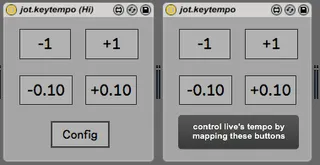
jot.keytempo hi
This Device lets you control Live's tempo with any button b...
- Type
- Audio Effect
- Author
- Render
- Version
- 1.0
- License
- Attribution
- Live version
- 9.7.7
- Max version
- 8.0.3
- Downloads
- 226
- Updated
- No Updates
jot.keytempo hi is an Audio Effect for Ableton Live by Render, distributed as Creative Commons Attribution. It targets Live 9.7.7 and Max 8.0.3. On maxforlive.com it has 226 downloads. Published 2019-05-26.
New to Max for Live? Read what Audio Effects do, what the Attribution license means, how to install a device.
Description
This Device lets you control Live's tempo with any button based device, e.g. keyboards, etc. (any human interface peripheral)
This is a derivate from my normal keytempo device,
(http://www.maxforlive.com/library/device/5487/jot-keytempo)
jot.keytempo_hi is a lot more complex.
it was basically born with the wish to have some kind of repeat, so when you hold the button down, the tempo increases. this is not possible in the normal key map mode, due to not having a momentary mode.
jot.keytempo_hi uses the hi max object (hence the name lol) you have to hit the config button the first time you use it, put the numbers in accordingly and hit save. It will create a folder & a preset file and load that up everytime its started.
So you only have to do it once.
I used this to have a second "numpad" keyboard from across the room control abletons tempo, so I dont know how this works with other hi-compatible devices.
Also I did this whole "save the preset externally" thing for the first time, so I'm not 100% sure it works on all systems. Did mine on OSX.
Let me know!