Macrobs II
Macrobs II is a set of custom macro knobs & sliders for Able...
- Type
- Audio Effect
- Author
- floszk
- Version
- 2.0
- License
- Commercial
- Live version
- 10
- Max version
- 8
- Downloads
- 0
- Updated
- 2020-02-19
Macrobs II is an Audio Effect for Ableton Live by floszk, distributed as a commercial (paid) device. It targets Live 10 and Max 8. First published 2019-08-30, last updated 2020-02-19.
New to Max for Live? Read what Audio Effects do, what the Commercial license means, how to install a device.
Description
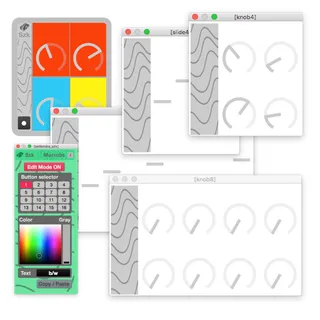
Macrobs II is a set of custom macro knobs & sliders for Ableton Live. Just unlock then click Live’s parameters to create your custom mapping easily. Colors can be set for each button. The minisuite includes on-track and standalone devices.
Feel free to contact me anytime if you need a customized versions, ontracks or standalone.
Enjoy !
Includes :
• 7 ontracks devices : knobs x1 x2 x4 x8, slides x1 x4 x8
• 4 standalones devices : knobs x4 x8, slides x4 x8
Documentation is available within the device.
Compatibility :
Live 10+
Max 8+
Includes MACROBS v1.0 LIVE9 MAX7 (28x devices !)
# MENU BUTTON
Click on the bottom-left button to make the Setting window appearing.
# SET MACROBS
Click to open the Edit Mode
Once the Edit Mode is ON :
- Button Selector : allows you to pick the knob/slider you want to customize, from the 1st up to the 16th, from left to right, and top to bottom
- Color / Gray : adjust the color
- Text : choose Black or White
- Copy/Paste will apply the same setting : just pick another knob/slider via the Button Selector, then click.
# GRIP PARAMETERS
Click to open the Edit Mode :
- Orange buttons will appear over the knob/sliders.
- At this time the Grip is LOCKED = nothing changed.
- PROCEED ONE BY ONE :
1# Clicking over the button will turn it RED = UNLOCKED
2# Click any parameter somewhere on your live set (parameters can be those on other tracks).
3# Once gripped, the parameter's name will appear over the knob/slider area
Note : Text area can be edited directly by entering new text.
4# RE-LOCK (button turns back ORANGE).
5# Do the same sequence for each knob or slider, one after one.
# MIDI MAPPING
Midi mapping : map the Ableton Live buttons (PINK).
# RESET PARAMETERS
Same way than gripping, but click on the button itself.
______________________________________________________
szk.MACROBS II
______________________________________________________
v2.0 | Live 10 | Max 8
Szk Devices (Fr) ∿ Minimalism ∿ Noise ∿ Maps & Interfaces
______________________________________________________
All our devices on Sellfy :
https://sellfy.com/szkdevices
______________________________________________________
All our devices on Gumroad :
https://gumroad.com/szkdevices
______________________________________________________
For more information please visit :
http://m4l.szk.fr/
______________________________________________________