a better search for max devices
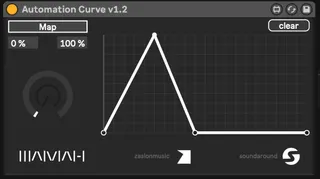
Automation Curve screenshot

Automation Curve

by zaSLON

Draw a custom curve and map it to any device dial. To...

View on maxforlive.com

Type
Audio Effect
Author
zaSLON
Version
1.2
License
Attribution
Live version
10.0.1
Max version
8
Downloads
1,681
Updated
2022-11-15

Description

Draw a custom curve and map it to any device dial.

To make the Automation Curve work with third-party plug-ins, we have to insert the third-party plug-in into the ableton rack and bind the necessary plug-in parameters to the rack knobs. Then map the Automation Curve to those rack knobs, not plugin parameters. In this way everything will work without any problems. The idea is to make the third-party plugin look understandable to ableton and maxfor-live

Changelog:

v2.1 (https://maxforlive.com/library/device.php?id=5776)

4 curves (A, B, C, D) added

Each curve has 3 map buttons

v1.2

Initial release

Hi, everyone! I want to try a donation system for new devices, pay as much as you think fit.

I put a piece of myself into every device and spend sleepless nights to make them work perfectly, I like to create interesting and useful devices.

Thanks for your support.

Comments (9)

  • itsBREX · September 13 2019
    This is the jam right here! Great device!
  • zeep · September 16 2019
    This is exactly what i need. Will test it out! Do you know if it saves settings in a Rack? All similar m4l devices i've tried so far don't save settings in racks.
  • zaSLON · September 16 2019
    Hey @broah, thanks! Hey @zeep! Yes, it saves its state inside a rack (mapping and curve), you can save a rack preset and drop it with saved settings anytime later :), and of course, it saves its state when you save your project. Cheers!
  • zeep · September 18 2019
    Hi zaslon, it works as advertised. Great plugin. Thanks!
    A wish for the next version, to be able to map multiple devices and multiple curves, in 1 instance of Automation Curve.
  • zaSLON · September 22 2019
    Hey @zeep! Thanks, no problem :)
  • BrooksAudio · November 14 2020
    Thanks so much for this device, it does exactly what I need, and in a very clear way.
    Is there a way to delete points from the curve?!
  • rhythmhead · November 11 2022
    Love the device and was using it quite heavily. However, it quit saving the mapped parameters for a preset audio rack a created containing the device. I even went to your site to buy the updated version. Same thing, I created a rack that uses your device inside of it but when I try to save that rack and and reload it, al the mapped parameters are lost. Please fix if you can, your device has become very important for my workflow, thanks so much
  • zaSLON · November 11 2022
    Hey, rhythmhead, I've just tested device inside the rack and it works fine. Saving, reloading works perfect, parameters are mapped after loading saved rack with this device inside. Please, send me your rack or describe how it mapped at [email protected]
  • zaSLON · November 15 2022
    To make the Automation Curve work with third-party plug-ins, we have to insert the third-party plug-in into the ableton rack and bind the necessary plug-in parameters to the rack knobs. Then map the Automation Curve to those rack knobs, not plugin parameters. In this way everything will work without any problems. The idea is to make the third-party plugin look understandable to ableton and maxfor-live

← Back to search