- Type
- Audio Effect
- Author
- ShelLuser
- Version
- 0.1
- License
- None
- Live version
- 10.0.1
- Max version
- 8
- Downloads
- 531
- Updated
- No Updates
PushLock is an Audio Effect for Ableton Live by ShelLuser, distributed as freeware, with no license specified by the author. It targets Live 10.0.1 and Max 8. On maxforlive.com it has 531 downloads. Published 2019-10-21. 4 user comments below.
New to Max for Live? Read what Audio Effects do, how device licenses work, how to install a device.
Description
As you probably know the Push automatically selects the active track which then becomes available to tweak on Push. So what if you want to play with a few tracks while also configuring a device (Glue compressor?) on another track (like the Master)?
Forget about note mode while the Master is active, so now what?
Enter PushLock...
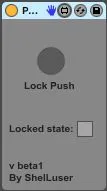
Midi map the button (I use a pedal while Push is in user mode) select a device on Push which you want to control then hit the button (I keep user pressed on Push then stamp my pedal and release the user button).
Now your Push is locked to the active device. You can switch channels, you can switch devices; it doesn't matter because you'll be focused to one device only.
Hit the pedal again to unlock Push.
WARNING: This is a beta! There's no danger of damaging your Push but there are some small hiccups which I'm still ironing out. Worst case you might have to reset your Push (turn off & back on).
Comments (4)