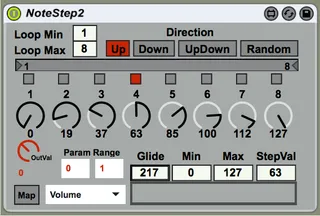
Note Trigger Parameter Step Sequencer
Based on user 'prebentious' device. (https://maxforliv...
- Type
- MIDI Effect
- Author
- dfodel
- Version
- 2.0
- License
- Attribution
- Live version
- 9.7.7
- Max version
- 7.3.5
- Downloads
- 1,141
- Updated
- 2019-11-13
Note Trigger Parameter Step Sequencer is a MIDI Effect for Ableton Live by dfodel, distributed as Creative Commons Attribution. It targets Live 9.7.7 and Max 7.3.5. On maxforlive.com it has 1,141 downloads. Published 2019-11-13. 4 user comments below.
New to Max for Live? Read what MIDI Effects do, what the Attribution license means, how to install a device.
Description
Based on user 'prebentious' device.
(https://maxforlive.com/library/device/129/note-trigger-step-sequencer)
This device takes an incoming note (any note) as a trigger for a looping configurable (1-8) number of steps that send out parameter value changes to any mapped Live device parameter. I went ahead and made the changes to the original device so that it now remembers all the values one had it set to when you reload the Live set. I also made a few cosmetic changes, and had it create default values on loading that are more friendly. You can set the range of a device parameter and it will scale to that range. The default values are 0 and 1 since most Live controls are in that range, but it gives one the option to set it to whatever values you want. It is otherwise pretty self-explanatory.
Comments (4)
Few points of note:
- Having both range and min/max feels a bit redundant, at least I was a little bit confused at first!
- Is there a functionality to unmap the mapped parameter, in similar fashion as the core M4L modulation tools provide? That would be helpful! Currently I'm constantly mapping things empty parameters to "unmap"/change routings.
- I'm into the chosen alternative color-scheme, looks cool ;).
Cheers!