a better search for max devices
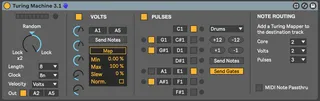
Turing Machine screenshot

Turing Machine

by mindlesstrx

Based on Music Thing Modules' Turing machine and Volts / Pu...

View on maxforlive.com

Type
MIDI Effect
Author
mindlesstrx
Version
3.1
License
None
Live version
10.0.7
Max version
8.1.0
Downloads
11,897
Updated
2020-05-04

Description

Based on Music Thing Modules' Turing machine and Volts / Pulses Expander. If you like this device, please consider a donation via Gumroad: https://gumroad.com/l/turing

* Generate MIDI note patterns through three engines and morph them with a touch of randomness.

* Use the Volts engine to modulate any parameter in live and / or provide note velocities.

* Use the Pulses engine to control the gate or set up a drum machine pattern.

* Send the MIDI output of any part of the module to any other track using the Turing Machine Mapper, available here: https://maxforlive.com/library/device.php?id=6233

* Use Live's clock or create your own arbitrary clock pulses / velocities by using a MIDI pattern as input

Comments (31)

  • hatyn · February 12 2020
    great - but had to edit the max value of the mappable percentage by changing numbox to float and to 500 as a quick fix.
    Also when opening the device some .svg was missing
    "live.text: can't find multimap-unmap.svg"
  • robschoen · February 15 2020
    Is it supposed to sync with the Ableton clock? It doesn't seem to be syncing.
  • mindlesstrx · February 15 2020
    Hi Rob - It should sync with the clock. What behaviour are you seeing?
    Hatyn - fixed the SVG. Can you give me more info about the number change you had to make and why?
  • roman747 · February 17 2020
    when i open the device, i see a lot of weird looking cases which cover the descriptions of the functions. Do you know what to do? Should i use a specific version of Ableton live? Mine is 10.1
  • hatyn · February 18 2020
    Mindlesstrx - Volts modulations weren't automating parameters of devices high enough - 100% knob value on a Volt step would be 50% on the Analog device filter cutoff for example, so I just edited the max value of the Volt knob to some extreme.
  • hatyn · February 18 2020
    Mindless - actually its more like 0-113hz on the Analog cutoff when a Volt step is 0-100 and the cut off value goes from 0-22,000hz . Maybe the automation is sending actual parameter value and not a percentage. I haven't studied the device long.
  • hatyn · February 18 2020
    Mindless - I changed the /500. to /100. in this version. Why is it /500 originally? Maybe its mapping to a cv or something? It seems to work well with Ableton devices with this edit though.
  • hatyn · February 18 2020
    just adding a note for stuff i would add - smooth/average controls of Volts and Pulse mapping (perhaps with latch mode)
  • mindlesstrx · February 18 2020
    Hatyn- The maximum output of the Volts module is 500. Up to 100 for each of the Pots. That's why I divide by 500. But as you've noticed it's very rare top reach this high, sine the pots would all have to be maxed out and you'd have to have Bits 1-5 all at 1 in the original sequence. Perhaps I should normalise it to the max of the 5 current pot settings rather than the theoretical max of the pots.
    Re: the suggestions I agree. Will look at that.
    PS - just uploaded a new version with a couple bug fixes and loop lengths less than 8.
  • mindlesstrx · February 18 2020
    Roman747- can you share more details? Should work fine in Live 10.1 (that's what I am on)
  • hatyn · February 19 2020
    mindless - ah all clear!
  • zenke · February 22 2020
    Thanks very much. Its working fine for me. I am on 10.1.7
    I'm enjoying playing with it also using scale and other midi devices.
  • hatyn · March 10 2020
    multiple instances of the device seem to interfere. haven't checked under the hood but probably something to do with the send/receive variable names. Pretty sure there is a way to generate a unique id per instance on device load in ableton. Need to do that for one of my own things, so will check it and update you.
  • hatyn · March 10 2020
    think i got it. the s/r pairs should have --- before the variable and not --
  • mindlesstrx · March 10 2020
    Seems like it is time to upload v2.0 which has these fixes and a few more features. Enjoy!
  • hatyn · March 10 2020
    awesome!
  • hatari · March 21 2020
    I have not been able to use it and have weird boxes that don't respond, nothing responds actually. Can anyone help, please? Cheers.
  • mindlesstrx · March 21 2020
    Hi hater - what version of Max and Live are you using? Feel free to hit me up at [email protected] with a screenshot.
  • mindlesstrx · March 21 2020
    Sorry about the auto-correct. That should say Hatari!
  • mindlesstrx · March 28 2020
    Looks like the issue some people are seeing with labels not rendering is a bug in earlier versions of live 10.1. Upgrade to latest version 10.1.9 and all should be good.
  • crabface · April 27 2020
    Thanks for the device! Is there a way to map the pulses or 'out' to another track? What I love about the Eurorack or VCV version is patching drums from the pulses and modulation or pitch from the volts and the CV out and just using the random knob as a macro
  • mindlesstrx · April 28 2020
    Not right now. I'll add a little modulation map that allows the midi notes from each device to be sent to any Live track. Will probably take me a week or so.
  • crabface · April 28 2020
    Amazing, can't wait for that! thank you
  • mindlesstrx · May 04 2020
    Updated! Check it out. You'll need to update and to download the mapper from here: https://maxforlive.com/library/device.php?id=6233
  • crabface · May 04 2020
    amazing, thanks Alex!
  • Syn · October 07 2020
    This is similar to those euclidean sequencers. Not bad.
  • konzepte · December 06 2020
    not fully understanding what the Volts do – particularly what the fader dials do there. any help? otherwise loving it!
  • mindlesstrx · December 06 2020
    Volts takes the 5 lowest bits and converts them into a value between 0 and 127 by multiplying each bit by the corresponding fader dial.
  • CountDooku · October 25 2022
    I see that you can't midi map min/max. I was hoping to map these to my controller to make an offset, so for instance I'd I am modulating the decay of a hi-hat, I could use the offset to reduce the amount of modulation coming from the TM, and control it manually. Is there a way to do this? Thanks!
  • nu · August 23 2023
    Hi, first of all, really great device, thx! Now, i would like to add a couple of more measures for the lenght, ii went inside the inspector, and added the number in the range/enum, and saved. Now the device shows the new measures, but when i select them, it stops to works. Any advice? Thx
  • miyake · November 27 2023
    Absolutely love this sequencer! Really great device.

← Back to search