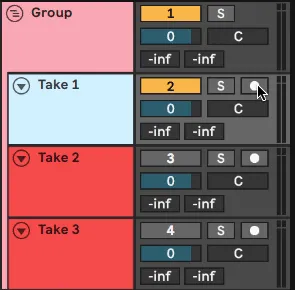
Comping Takes
A Max for Live device that massively speeds up and streamlin...
- Type
- Audio Effect
- Author
- MessinkiMusic
- Version
- 3.0
- License
- None
- Live version
- 10.1.18
- Max version
- 8.1.2
- Downloads
- 1,018
- Updated
- 2020-09-25
Comping Takes is an Audio Effect for Ableton Live by MessinkiMusic, distributed as freeware, with no license specified by the author. It targets Live 10.1.18 and Max 8.1.2. On maxforlive.com it has 1,018 downloads. First published 2020-03-09, last updated 2020-09-25. 13 user comments below.
New to Max for Live? Read what Audio Effects do, how device licenses work, how to install a device.
Description
A Max for Live device that massively speeds up and streamlines comping workflow in Ableton Live
I’m now hosting this on Gumroad, so please follow the link to it there. https://gum.co/pRttdS
Features:
In a group of tracks, only the selected track is unmuted, so that you can quickly listen to multiple takes of a recording.
Soloing and arming also follows the selected track
Automatically creates, names and colours new takes when needed, after recording
Automatic naming and colouring of tracks to provide visual feedback when stitching together multiple takes in a comp track
Buttons to assist setting up and removing a comp group
input and monitoring state of the selected track is applied to all tracks in group.
Comments (13)
You did it! Great comping tool and very elegant group track ! one feature we all wanted for age!
Thank you so much!
Next step would be, in all group sharing the same name device, to link other actions, like add a track, delete a track, copy a track.
And after that, another step would be the ability to create and select a new track in every armed group when rerecording.
Another idea would be the ability to link editing between groups. But I don't know if Max4live would allow that.
One question / suggestion tho - what do you think about making it so if two tracks share the same name in different groups say with the same identifier - i.e. vox [take_01] - those will me muted / unmuted together, rather than having it just be first track linked with first track, second with second, etc.?
https://i.imgur.com/0gfUAxI.png
Taking that idea one step further, this second image would also disable the clips on the muted tracks making it easier to see the overview of what parts you're taking from each clip:
https://i.imgur.com/IZOZRjx.png
The other (related) thing that would be really useful to take this a stage further- and I don't know if it's possible - is when looping is on, when you reach the end of the loop, the next track is automatically selected and armed so you could fluidly loop record takes.
I've download the device, i'm very excited but it doesn't seem to work, do you have a small tutorial?
Kr,
Wim
+1 "when looping is on, when you reach the end of the loop, the next track is automatically selected and armed"
Maybe a version for miditracks wouldn´t be too much work?
And I found a small bug I think that propably doesn´t happen very often but it happened to me: when you have a device with automation on the group track or on one of the recorded audiotracks, and then at some point remove the comping group, then all the automation is gone.
I think this device is very great, and it should really be integrated into Live as a standard. Maybe write to them and they´ll give you a job ;))
tim
I need a device that will hold the ARM forever during a live session, so that everything that happens in the DAW was recorded. Because if you use a looper, the Ableton won't record it. Using comand+click will not help, because I use a lot of tracks and do everything through controllers on the fly.
So far I know only one device, it's _P4R - Arm-Me audio v1.5 But it stops recording as soon as you turn on ARM on another track. PLEASE HELP!!!
Translated with www.DeepL.com/Translator (free version)