- Type
- MIDI Effect
- Author
- s8jfou
- Version
- 1.0
- License
- None
- Live version
- 10.1.6
- Max version
- 8.1
- Downloads
- 2,408
- Updated
- 2022-12-02
Pitcho is a MIDI Effect for Ableton Live by s8jfou, distributed as freeware, with no license specified by the author. It targets Live 10.1.6 and Max 8.1. On maxforlive.com it has 2,408 downloads. First published 2020-05-29, last updated 2022-12-02. 1 user comment below.
New to Max for Live? Read what MIDI Effects do, how device licenses work, how to install a device.
Description
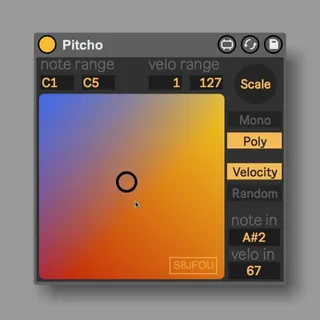
Pitcho is a smart freestyle pitcher.
He’ll be the best friend of self-generative music, happy accident, or even randomly played & scaled chords. Simply set the note range for Horizontal axis, and the velocity range for Vertical axis. Go to scale to choose which notes Pitcho will play, and that’s it ! Press and sustain any key of your keyboard to activate him, and click anywhere on the pad.
Pitcho is active only if you press and sustain a key, he will stop if you release it.
He can be monophonic or polyphonic, it means he can trig only one note per time or sustain all notes he already triggered, until your release a key.
*bug fixed : random velociy not working.
** scale wasn't initialize correctly, so no midi output without touching the scale when loading the device.
Demo here : https://www.youtube.com/watch?v=a3xJLGvWuvA
Pitcho is a free Max for Live device, but if you want to support my work you can donate what you want via paypal to : [email protected]
https://www.s8jfou.com/maxmsp
Comments (1)