- Type
- MIDI Effect
- Author
- chapelierfou
- Version
- 1.0
- License
- None
- Live version
- 10.1.17
- Max version
- 8.1.5
- Downloads
- 333
- Updated
- 2020-09-08
Ti-ga-di-ga-doum is a MIDI Effect for Ableton Live by chapelierfou, distributed as freeware, with no license specified by the author. It targets Live 10.1.17 and Max 8.1.5. On maxforlive.com it has 333 downloads. Published 2020-09-08. 2 user comments below.
New to Max for Live? Read what MIDI Effects do, how device licenses work, how to install a device.
Description
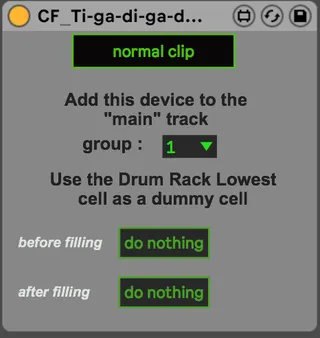
Ti-ga-di-ga-doum will handle drum rolls for you !
The idea is to make a drum track containing fills beside the main drum track.
Drop the main device in the main track and the filler device in the fill track. Set up the group.
Now when you trigger a new clip on the main track it will instantly play the filling clip instead of the main one.
Be sure to put a C-2 as a flag trigger at the very end of the filling clip otherwise it will be stuck in filling mode.
Enjoy.
Demo video : https://www.youtube.com/watch?v=PzGi46s_37U&feature=youtu.be
Comments (2)
I got a crash when pressing "Only Fill" after setting everything up and having it work as shown.
I assume "Only Fill" is a way to work on your drum fill as you prepare the structures.
Who knows why it crashed, it was a totally blank project template with 1 group track consisting of a default DS Drum Rack and another Midi track for fills.
I recovered the project and seems its working as it should now. Will spam more if i can get it to happen again.
I've encountered some unwanted things with "fill only", but no crashes. I'd be happy to investigate. If you manage to find a way to make it crash 100% of the time that would help a lot.
Otherwise, yeah, you got it, "only fill" allow you to listen to the clip.
Thanks for trying and reporting.