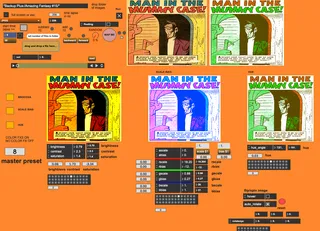
- Type
- MIDI Effect
- Author
- Sinex5
- Version
- 1.3
- License
- None
- Live version
- 10.1.18
- Max version
- 8.1.5
- Downloads
- 644
- Updated
- 2023-03-23
Image Player is a MIDI Effect for Ableton Live by Sinex5, distributed as freeware, with no license specified by the author. It targets Live 10.1.18 and Max 8.1.5. On maxforlive.com it has 644 downloads. First published 2020-09-11, last updated 2023-03-23. 7 user comments below.
New to Max for Live? Read what MIDI Effects do, how device licenses work, how to install a device.
Description
A simple image player that can be mapped to amplitude.
It now has a simple random percentage knob, backwards
and forwards. Map the envelope follower to the MAP ME button and play a beat in the envelope follower track.
It has a time lapse button so you can cycle through your files
in milliseconds, but too fast and it could stall. Some simple effects such as brocosa, scale bias and hue, and rotate xyz. Fixed the "full screen" just press escape. I am a self taught Max user and so I don't know how to make a floating window correctly. But it works and stable even with thousands of images.
Enjoy.
Comments (7)
Then you set the file type (say jpeg is for jpg's) then set the number of files
for it but usually reads the number of files automatically. Setting the number of files in "adjust number of files and then push button" --push button. One way of making it work: Put a beat on
an audio track--put an envelope follower on that track. Map the the MAP ME button to the envelope follower. Play the beat. It should cycle through all your image files. The floating window should make a small window where you can monitor your files. The fullscreen$1 should turn your whole screen into the images as if you were projecting them.
Second way of making it work: Press "start timelapse" and an internal millisecond clock will cycle through your images. The shorter the numbers the faster the images will cycle. Counterintuitive but works.
Maybe I will change it to a bpm number but I figured mapping does the same thing. Good luck. If that don't work I will make a video.
- reverse the order of the instruction "Map the the MAP ME button to the envelope follower" to "Map the envelope follower to the MAP ME button", because at first it seems like that button is a map button.
- get rid of the @popup 1 on that print message. It makes a weird artifact where the popup messages will appear if you have other track selected.
- make it an audio device, since it is supposed to always live after the envelope follower?
- fix the fact that the floating video window is always on
- and specially fix the fact that pressing 'esc' goes to fullscreen, and pressing 'esc' again makes the floating window not fullscreen but the size of the screen and in front on Abes. Which is a problem because... you can't close this floating window!
Even if only to share some of your artistic where you use this device, a video would be nice :)
Best,
OCH
full screen now using esc key. But I decided to leave it as a midi instrument, because I can adjust the latency of the audio signal or the latency of the midi instrument (image player) if I encounter latency in triggering images.