Slynks Spectral Subtractor
This device takes 2 stereo inputs and will spectrally subtra...
- Type
- Audio Effect
- Author
- Slynk
- Version
- 1.0
- License
- None
- Live version
- 10.1.18
- Max version
- 8.1.5
- Downloads
- 1,793
- Updated
- 2020-11-04
Slynks Spectral Subtractor is an Audio Effect for Ableton Live by Slynk, distributed as freeware, with no license specified by the author. It targets Live 10.1.18 and Max 8.1.5. On maxforlive.com it has 1,793 downloads. Published 2020-11-04. 1 user comment below.
New to Max for Live? Read what Audio Effects do, how device licenses work, how to install a device.
Description
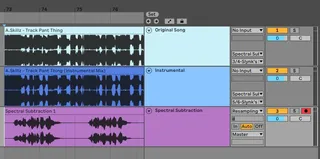
This device takes 2 stereo inputs and will spectrally subtract one from the other. It's intended use is to subtract an instrumental version of a song from the full version leaving you with a DIY acapella.
How to set it up:
You need 3 audio channels.
Channel 1 will be playing the original song and sending output to 3/4 into the Spectral Subtraction device.
Channel 2 will be playing the instrumental version and sending output to 5/6 into the Spectral Subtraction device.
Channel 3 will simply have the Spectral Subtraction device. You can set this channel to "Resampling" and record the result of the subtraction.
Look at the screenshot for a better idea.
Check out this video for more information. Relevant info at 8:40.
https://youtu.be/Pkd9D4uxGYA?t=520
Or if you need more help you can always send me a message on my website. https://slynk.net/contact
Comments (1)