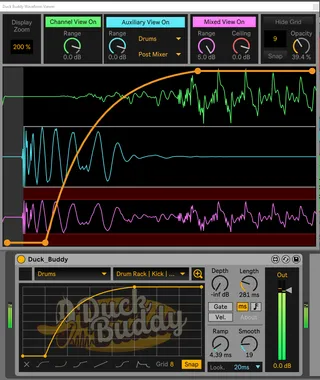
Duck Buddy - OLD LINK. SEE DESCRIPTION0
This device has moved and will continue to be updated here: ...
- Type
- Audio Effect
- Author
- Slynk
- License
- AttributionShareAlike
- Live version
- 11.0.1
- Max version
- 8.1.9
- Downloads
- 12,819
- Updated
- 2021-10-04
Duck Buddy - OLD LINK. SEE DESCRIPTION0 is an Audio Effect for Ableton Live by Slynk, distributed as Creative Commons Attribution-ShareAlike. It targets Live 11.0.1 and Max 8.1.9. On maxforlive.com it has 12,819 downloads. First published 2021-03-24, last updated 2021-10-04. 22 user comments below.
New to Max for Live? Read what Audio Effects do, what the AttributionShareAlike license means, how to install a device.
Description
This device has moved and will continue to be updated here: https://maxforlive.com/library/device.php?id=7623
Comments (22)
One issue: the Depth knob on Push isn't bound to the actual knob on the device. I haven't open up the device yet, though, but that'll be a quick fix.
[Bug] If you group or ungroup the device, it looses its Input routing. Any way to fix that?
With v0.3 I experience the behaviour, that the device looses input Routing (or more preciseley it redirects the input routing to another track) when I move the Track, from which I take the input routing. It seems the redirect of the input routing goes to the track with the same number index from which the original track has been moved.
Yes it's a great device !
Bug I have an anoying bug.
If I press one of the menus of the "big view" : Live shuts down immediatly..
11.0.5b3
Windows 10
MAx 8.1.11
By menus do you mean the analog source selection for the external signal? I definitely haven't seen this issue before, though we've been running on Live 11.0.10. If you don't have a reason to stay on b5, I'd suggest updating Live, as it's possible that will fix the issue. If you'd like to follow up on this issue further and you're on Discord, that's probably the best place to reach us.
Evey time i open a project it`s like it loses the latency compensation and i have to set another lookahead value to "resync" it.
Also over time the whole graphic display of the envelope section begins slowly to drift to the left and i have to open again the project to fix this issue. Full screen mode slows down the whole system a lot!
If these can be fixed it`be a very handy plugin.
I tried the 2 latest ableton 11 betas including the 11.1 and still the same. Using win 10.
Thanks for the bug reports. I'll look into these issues this weekend. The full screen performance issue is a known problem, as the live.scope~ controls are a bit demanding in terms of resources when running at large size. I'm working on a custom graph control to improve performance, but might take a while to get it implemented.
By graphic display of the envelope, do you mean the shape editor on the main plugin view? That's a pretty weird issue, if so. I'd be curious if you run into a similar problem with other M4L plugins using the shape editor, like Shaper. If so, there may be a bug in Max that impacts your system in particular, possibly video driver related.
great work!
But I also have a bug here. Maybe it's me and not the device?
I can't route my sidechain anymore unless I use the fullscreen - but even then it's not sidechaining anymore. The only thing in the "input" row I can choose from are MIDI Channels??
Am I using it wrong?
Thx for help
So, my "analog source selection" doesn't work anymore. No matter how often I delete the device and reinstall it.
I think maybe there's a misconception about how the device works? Duck Buddy is designed for triggering based on MIDI notes; it doesn't trigger based on audio. The audio input is provided for visualization to see your ducked signal in the context of another signal, but it's not used for triggering.
Since it's been a popular request, we're working on a new plugin, Duck Call, to generate midi notes from an audio channel so that Duck Buddy can bind to them. Let me know if I've understood your problem correctly; the best place to reach us is over Discord, but I do check here periodically.
So, it was me then.
Okay got you!
Thx ;-)