msl.ClipSelector
---About--- This device lets you control the session view...
- Type
- Audio Effect
- Author
- masalaaudio
- Version
- 1.0.1
- License
- Commercial
- Live version
- 11.0.2
- Max version
- 8.1.9
- Downloads
- 0
- Updated
- 2021-04-12
msl.ClipSelector is an Audio Effect for Ableton Live by masalaaudio, distributed as a commercial (paid) device. It targets Live 11.0.2 and Max 8.1.9. First published 2021-01-19, last updated 2021-04-12. 1 user comment below.
New to Max for Live? Read what Audio Effects do, what the Commercial license means, how to install a device.
Description
---About---
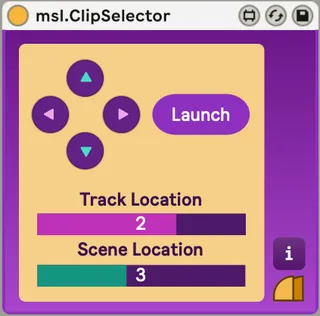
This device lets you control the session view from an external Midi device, select clips, play/stop and record.
---Sample Videos---
https://youtu.be/do24qeYg4Wc?list=PLoGGKEf8VzMNoubNHzf20PSxNTF_NCfQH
---How to use---
Each button on the device can be assigned to a button on the Midi device.
Pressing the arrow buttons will change the selected clip slot.
If the track is not recordable, pressing the "Launch" button will play/stop the clip slot.
If a track is recordable, pressing the "Launch" button will record to/stop from that clip slot.
---Where to get---
For more information, access to
https://masalaaudio.com/all/max-for-live/expander/clipselector.html
This device is also included in our Allspice Set Vol.1.
https://masalaaudio.com/products.html
Comments (1)