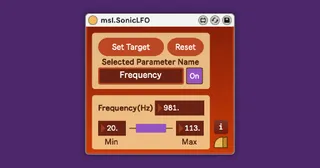
msl.SonicLFO
---About--- msl.SonicLFO is a type of LFO, that automatic...
- Type
- Audio Effect
- Author
- masalaaudio
- Version
- 1.0.3
- License
- Commercial
- Live version
- 11.0.2
- Max version
- 8.1.9
- Downloads
- 0
- Updated
- 2021-05-06
msl.SonicLFO is an Audio Effect for Ableton Live by masalaaudio, distributed as a commercial (paid) device. It targets Live 11.0.2 and Max 8.1.9. First published 2021-02-02, last updated 2021-05-06. 2 user comments below.
New to Max for Live? Read what Audio Effects do, what the Commercial license means, how to install a device.
Description
---About---
msl.SonicLFO is a type of LFO, that automatically operates any other Live parameters.
Not only that, it can be Ultra High Speed(=Ultra High Frequency).
---Sample Videos---
https://youtu.be/6g8-dno4QNo?list=PLoGGKEf8VzMPvHPfgvY32qkr09jQS5FbG
---How to use---
1. Click the "Set target" button.
You will see the button changes to "Click target."
That means the device has switched to parameter selection mode.
2. Select any Live parameters that you want to assign.
Once assigned, the "Name" box will display the name of the assigned parameter. Also, the parameter will be gray-out.
3. Set the number of Frequency, Minimum and Maximum values.
4. Click the "On/Off" button to start the operation.
5. If you want to unassign, click the "Reset" button.
---Where to get---
For more information, access to
https://masalaaudio.com/all/max-for-live/effector/soniclfo.html
This device is also included in our Allspice Set Vol.1.
https://masalaaudio.com/products.html
Comments (2)