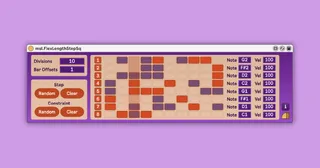
msl.FlexLengthStepSq
---About--- Step sequencer with a variable number of step...
- Type
- MIDI Effect
- Author
- masalaaudio
- Version
- 1.0.1
- License
- Commercial
- Live version
- 11.0.2
- Max version
- 8.1.9
- Downloads
- 0
- Updated
- 2021-05-06
msl.FlexLengthStepSq is a MIDI Effect for Ableton Live by masalaaudio, distributed as a commercial (paid) device. It targets Live 11.0.2 and Max 8.1.9. First published 2021-04-28, last updated 2021-05-06. 1 user comment below.
New to Max for Live? Read what MIDI Effects do, what the Commercial license means, how to install a device.
Description
---About---
Step sequencer with a variable number of steps and loop length to create flexible polyrhythms.
For example, if Ableton Live is set to a 4/4 time signature and "Bar Offsets" is set to 1, then a loop of 5 quarter-note beats can be divided into the number of divisions specified in "Divisions".
---Sample Video---
https://youtu.be/5v_nkCpe6Yk
---How to use---
[General]
Divisions ... You can change the number of grids in the sequencer.
Bar Offsets ... You can add a number between 0 and 4 to the number of beats in the time signature set in Live.
For example, if the time signature is 4/4 and set Offsets to 1, the total length of the grid will be 5 quarter-note beats.
[Step]
Random ... With each click, the step sequencer cell is randomly selected.
Each time you press the button, the selected cell will be increased.
Clear ... Set all cells to clear.
[Constraint]
Random ... Randomly enable/disable the cell of the step sequencer.
Clear ... Set all cells back to selectable.
[Grid]
Grid ...When selected, the cell will turn red and the MIDI specified by "Note" and "Vel" in that row will be output.
The length will be the length of one beat, calculated by the number of "Divisions".
Note ... Specifies the MIDI pitch.
Vel ... Specifies the MIDI velocity.
---Where to get---
For more information, access to
https://masalaaudio.com/all/max-for-live/expander/flexlengthstepsq.html
This device is also included in our Allspice Set Vol.1.
https://masalaaudio.com/products.html
Comments (1)