- Type
- MIDI Effect
- Author
- Mortimyrrh
- Version
- 3.2
- License
- None
- Live version
- 10.1.18
- Max version
- 8.1.5
- Downloads
- 0
- Updated
- 2024-09-17
Harp is a MIDI Effect for Ableton Live by Mortimyrrh, distributed as freeware, with no license specified by the author. It targets Live 10.1.18 and Max 8.1.5. First published 2021-02-25, last updated 2024-09-17. 10 user comments below.
New to Max for Live? Read what MIDI Effects do, how device licenses work, how to install a device.
Description
Sound like a Virtuoso, No Practise Required!
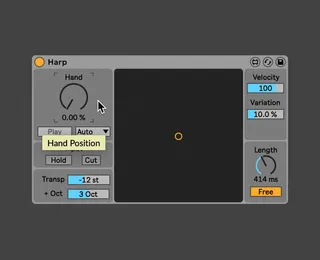
Harp is a MIDI Effect, that transforms the way notes are played. You can play a chord in one hand and use a dial or LFO in the other to sweep though the notes in as many octaves as you like! This makes you sound like a virtuoso on any MIDI instrument with no practice required!
1000+ Downloads - Thank You So Much!!
Works with Custom themes!
NB - You will need Java installed (this should already be done but max will prompt you if you need to do anything)
Install - Just place the .amxd file anywhere inside the User Library
Compatibility
Tested and working in Live 10, 11 and 12
Tested and working in MacOS and Windows.
Versions
3.1 (24/02/20) - Init
3.2 (25/02/20) - Fixes JSUI errors and Harp.class not being found.
Comments (10)
Could not load class 'Harp'
jsui: Harp2_GUI.js: Javascript ReferenceError: c is not defined, line 101
jsui: error calling function paint [Harp2_GUI.js]
The JSUI error is graphical and only happens on load, it should still work.
The "Could not load class 'Harp'" is more problematic sounds like the .mxj is not loading with the device I will take a look today and update you later.
v3.2 - Fixes JSUI errors and Harp.class not being found.
Let me know if you have any more problems :D
Does it produce any errors in the max console?
Do the notes appear in the LCD display (dark box in the middle)?
Is the Play Toggle enabled or in Auto Mode?
I tested it on another computer and it worked fine. To get it to play any notes you need to send in midi notes and move the Hand dial over them.
I'm using java version "1.8.0_281" - build 1.8.0_281-b09
@rs3d
Could you say what version it is not working for and I will trouble shoot the issue?
you can find out by typing "java -version" in terminal.
Thanks