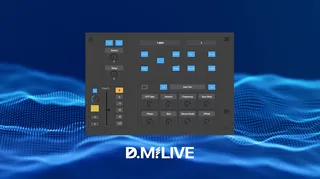
D.M.Live - Select Device
This device is a virtual controller for controlling Ableton ...
- Type
- Audio Effect
- Author
- malov
- Version
- 2.0.1
- License
- Commercial
- Live version
- 10.1.18
- Max version
- 8.1.5
- Downloads
- 1
- Updated
- 2021-03-04
D.M.Live - Select Device is an Audio Effect for Ableton Live by malov, distributed as a commercial (paid) device. It targets Live 10.1.18 and Max 8.1.5. On maxforlive.com it has 1 downloads. First published 2021-02-28, last updated 2021-03-04. 4 user comments below.
New to Max for Live? Read what Audio Effects do, what the Commercial license means, how to install a device.
Description
This device is a virtual controller for controlling Ableton Live.
Select Device - adds functionality for simple midi controllers and makes them more manageable.
The program consists of 5 sections:
1. Section - controller for managing the main Life windows.
Consists of 4 buttons:
1. Show / Hide Browser.
2. Choice of Session / Arrangement modes.
3. Selecting the Clip View / Device View window.
4. Show / Hide Detail View button.
2. Section - focus and navigation control controller.
Consists of 9 buttons:
Prev and Next buttons - navigate between tracks, one step to the right or left.
The Unfold Group button shows or collapses group tracks..
Play and Stop buttons - play and stop the selected clip.
Up Down buttons - scene navigation.
PlayS and AllSt buttons - playback stop scenes.
3. Section - Send Section control controller.
Consists of two select buttons Prev and Next, two control knobs Send A and Send B.
4. Mixer Section.
Consists of 7 controls:
1. Button "C" - Center Pan. When pressed, sets the panorama to the center.
2. Panorama control knob.
3. Mute Solo Rec buttons.
4. Slider - "Track Volume" - track volume control.
5. Buttons for selecting the maximum volume for the Slider - "Track Volume".
5. Section - device control controller.
Consists of 11 controls, allows you to select and control any Ableton Live device.
Device On / Off button - Controls turning devices on and off.
Prev and Next buttons - select devices.
8 Macro knobs - automatically assigned to control 8 parameters.
This device can be assigned to any MIDI controllers and also connected to the tablet using the MIRA app.
Comments (4)
I am not meaning to be rude at all. If English is not your native language I would be more than happy to help you with a proper description.
If English is your native tongue... come on. do better.
Only missing at least to map Send C Send D encoders.
Im looking for a device with midi mappable slots which can send all the shortcuts from a M4L device.
I think you you are able to do it :)