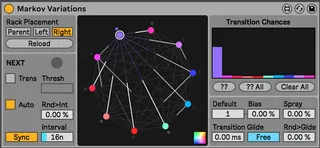
Markov Variations
FREE FREE FREE device! Use this device to transition between...
- Type
- Audio Effect
- Author
- ndivuyo
- Version
- 1.0
- License
- None
- Live version
- 10.1.18
- Max version
- 8.1.5
- Downloads
- 0
- Updated
- No Updates
Markov Variations is an Audio Effect for Ableton Live by ndivuyo, distributed as freeware, with no license specified by the author. It targets Live 10.1.18 and Max 8.1.5. Published 2021-03-04. 3 user comments below.
New to Max for Live? Read what Audio Effects do, how device licenses work, how to install a device.
Description
FREE FREE FREE device! Use this device to transition between Variations with a Markov Chain (Variations are the new presets/snapshots feature in Ableton Live's Racks). The device detects the stored variations on an assigned Rack, then it transitions between them with probabilities (using Markov Chain). You can change the way that a new transition is triggered (either with a mappable button or automatically at a set interval or when detecting transients). There are features for gliding and changing other functionalities relating to probabilities.
I have included another device in the .zip file that sends a trigger when MIDI notes are received to a mapped parameter. This is useful if you want to trigger transitions from MIDI notes (the additional device is called "Note Trigger Map").
**THIS REQUIRES LIVE 11**
Demo: https://www.youtube.com/watch?v=cR0J__kkhzg
Walkthrough: https://www.youtube.com/watch?v=Ux15uDYrw78
*TO INSTALL* Drop the unzipped folder in: ableton/user library/presets/audio effects/max audio effects. Make sure it is the folder called "Markov Variations" and NOT the folder called "Markov Variations v1.x.x"). LIVE 11 ONLY!!
Issues/etc: [email protected]
More: dillonbastan.com
Comments (3)
First very nice device, it's very fluid !
Suggest : as well as the recall of variations take accound "Exclude Macro From Variation"
the command spray could depends of "Exclude Macro From Randomization"
Suggest 2 : when we move manually a knobs it causes jump of values. Maybe when a new transition is triggered it could take accound of the current states of the knobs
Nice work!