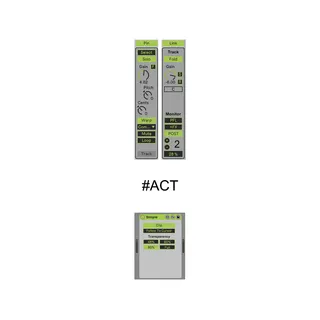
Audio Clip Tools
Audio Clip Tools - additional panel that allows you to contr...
- Type
- Audio Effect
- Author
- all4live
- Version
- 1.42
- License
- Commercial
- Live version
- 10.1.18
- Max version
- 8.1.5
- Downloads
- 0
- Updated
- 2021-07-27
Audio Clip Tools is an Audio Effect for Ableton Live by all4live, distributed as a commercial (paid) device. It targets Live 10.1.18 and Max 8.1.5. First published 2021-03-06, last updated 2021-07-27. 7 user comments below.
New to Max for Live? Read what Audio Effects do, what the Commercial license means, how to install a device.
Description
Audio Clip Tools - additional panel that allows you to control the parameters of the audio clip ....
warning : this device must be on the master track !!!!
up 1.2:
sоme - fix, add - "multi clip" tool ...
up 1.21:
sоme - fix
update #ACT
1: completely redesigned the concept of the patcher
2: buttons are now "LCD"
3: add control panel transparency in "pin" mode
4: add "Follow To Cursor" function
5: add "Track" panel
6: add "Link" function for "Track" panel in "Follow To Cursor" mode
7: add alternative solo mode, button -"Solo"
8: add "Select" - mode
9: add Track Monitoring in "Solo" mode
10: add Track-Clip vertical zoom and sensitivity for zoom buttons
11: add Track number in "Track" panel
12: add "Fold" function
14: add "Gain freez" function
15: "multi clip" temporarily disabled
16: renamed from Audio Clip Tools to #ACT
all previous versions are available and will not be removed
watch the video on the product page !!!!
warning : this device must be on the master track !!!!
#ACT_28_07_2021 : add x2 zoom for panels, add "List" - panel that displays all tracks of the project ....
https://www.facebook.com/100007549153534/videos/814281792611671/
to be continued :) ....
Comments (7)
I've been looking for an easier way to set those directly in the timeline, without having to open the clip view.
1) resizable
2) Not sure if possible but the ability to control multiple clips.
Also the "r" is for reverse right?? Seems to not be working for me in Live 11
Love the "pin" feature
rhythmhead,
1) are you talking about scaling options ? (zoom)
2) yes, in work, thinking about the concept ...
R. = reset audio clip parameters to default, does not work with track parameters
check the video on :
https://gumroad.com/l/AuClTo
Yes scaling os zooming would be nice, I feel the controls are a bit small
That looks really awesome, I like the implementation of being able to edit across different tracks. That a huge workflow improvement!!!
Keep it up, thanks