Easy Granular
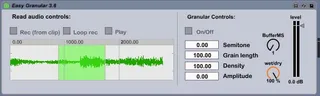
Easy Granular is my first attempt to create a Max for Live p...
- Type
- Audio Effect
- Author
- gallobruno
- Version
- 1.0
- License
- None
- Live version
- 8.2.2
- Max version
- 5.1.8
- Downloads
- 1,230
- Updated
- 2011-07-14
Easy Granular is an Audio Effect for Ableton Live by gallobruno, distributed as freeware, with no license specified by the author. It targets Live 8.2.2 and Max 5.1.8. On maxforlive.com it has 1,230 downloads. First published 2011-06-29, last updated 2011-07-14. 7 user comments below.
New to Max for Live? Read what Audio Effects do, how device licenses work, how to install a device.
Description
Easy Granular is my first attempt to create a Max for Live patch. I have used Michael Edwards externals, (mdeGranular~) so the credit is for him.
Video demo: http://www.youtube.com/watch?v=aFZVuRdYOOo
Instructions
-Install the patch in ableton live by drag and drop to the audio effects folder.
-Drop an audio file into the live set. Play it.
-Drop "Easy Granular" into the track.
-Rec into the buffer of the patch with the "Rec button"
-Activate the granular control parameter (ON)
-Just play with the other granular parameters and turn the Dry/Wet dial to wet.
---
Version 1.0
Red from clip
Dry/Wet
Comments (7)
how do you get the granulation going I can only make loops
Im on a Macbook pro Snow Leopard
all the best
Leif Isebring, Sweden
Sorry, I haven't freezed the patch before exporting it. Now it contains the mdeGranular~ external. Please try again.
Bruno Gallo - Argentina
http://www.youtube.com/watch?v=aFZVuRdYOOo
regards,
Bruno
I do exactly that but when it comes to the Granular section and I press the on nothing NOTHING happens when I turn the nob to wet
Is there an explanation?
all good
Leif
Could you tell me if you edit the patch, in max window do you see any error/ object missing?
Regards;
bruno
do you have a email so I could send a picture of the editwindow
there is some conflict I think
my email:
[email protected]
all the best
Leif