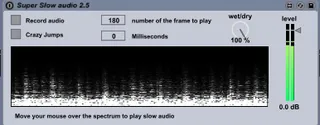
Super Slow Audio
"Super Slow Audio" is an Max4live that slows the incoming ...
- Type
- Audio Effect
- Author
- gallobruno
- Version
- 1.0
- License
- None
- Live version
- 8.2.2
- Max version
- 5.1.8
- Downloads
- 6,638
- Updated
- 2011-07-20
Super Slow Audio is an Audio Effect for Ableton Live by gallobruno, distributed as freeware, with no license specified by the author. It targets Live 8.2.2 and Max 5.1.8. On maxforlive.com it has 6,638 downloads. First published 2011-07-14, last updated 2011-07-20. 8 user comments below.
New to Max for Live? Read what Audio Effects do, how device licenses work, how to install a device.
Description
"Super Slow Audio" is an Max4live that slows the incoming audio of a clip applying granular synthesis. It even allows to freeze it completely. Its made with the excelent jean francois charles externals:
http://www.jeanfrancoischarles.com
Demo: http://www.youtube.com/watch?v=utlW0JHsf7I
Use:
First rec your audio from the live clip. Go wet, and start messing around with your mouse.
Optional parameter is "Jump", witch jumps across the buffer in a random way.
Comments (8)
Is it normal I can not unlock to edit ? (I need to control this with my Lemur !)
bruno