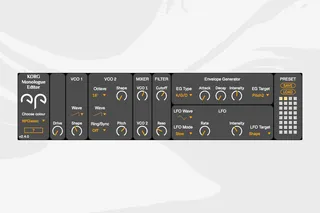
KORG Monologue Editor
This Max4Live MIDI device lets you control all parameters on...
- Type
- MIDI Effect
- Author
- NoraPatches
- Version
- 2.4.0
- License
- Commercial
- Live version
- 11.1
- Max version
- 8.3.1
- Downloads
- 0
- Updated
- 2022-08-27
KORG Monologue Editor is a MIDI Effect for Ableton Live by NoraPatches, distributed as a commercial (paid) device. It targets Live 11.1 and Max 8.3.1. First published 2021-03-24, last updated 2022-08-27.
New to Max for Live? Read what MIDI Effects do, what the Commercial license means, how to install a device.
Description
This Max4Live MIDI device lets you control all parameters on your KORG Monologue synthesiser with MIDI messages.
It uses standard MIDI CC messages, no SysEx included.
You can use it also to map and modulate these knobs with Max4Live LFO device or draw in automation curves for them in Arrangement View.
You can monitor MIDI CC messages from your hardware and reflect them on the device knobs. This works seamlessly both ways; plugin->hardware and hardware->plugin as well. Forget to worry if you twist a knob on the synth, the GUI immediately adjusts itself automatically and accordingly.
From v2.3 and above you can choose a skin for the plugin. The native NPClassic skin can be changed to pick up Live colours by switching it to Responsive.
What's new in 2.4.0? (2022.08.27.)
internal cleanup and bugfixes
redesigned GUI
added device updater (shift+click on logo to look for updates)
--------------------------
How to use:
1. In Ableton Live, create a new MIDI track
2. Add "Monologue240.amxd" to this track
3. Select "Monologue" as MIDI input for this track
4. Set Monitoring to IN
5. Add External Instrument from Ableton Live Instruments
6. Configure External Instrument to your MIDI OUT that you use for the Korg Monologue**
**Add a new audio track and configure the audio input of your audio interface connected with your synthesiser.]
--------------------------