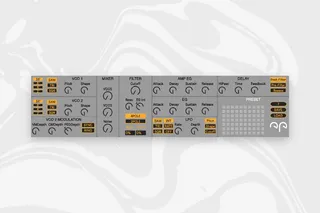
Korg Minilogue Editor
version: 2.3 Release date: 2021.11.28. Device format: ...
- Type
- MIDI Effect
- Author
- NoraPatches
- Version
- 2.3
- License
- Commercial
- Live version
- 10.1
- Max version
- 8.2.1
- Downloads
- 0
- Updated
- 2022-01-17
Korg Minilogue Editor is a MIDI Effect for Ableton Live by NoraPatches, distributed as a commercial (paid) device. It targets Live 10.1 and Max 8.2.1. First published 2021-03-25, last updated 2022-01-17. 9 user comments below.
New to Max for Live? Read what MIDI Effects do, what the Commercial license means, how to install a device.
Description
version: 2.3
Release date: 2021.11.28.
Device format: Max4Live MIDI Device (.amxd)
Release name and format: Minilogue PRO.amxd
Number of files: 1
--------------------------
This Max4Live MIDI device lets you control all parameters on your KORG Monologue synthesiser via MIDI messages.
It uses standard MIDI CC messages, no SysEx included.
You can use it also to map and modulate these knobs with Max4Live LFO device or draw in automation curves for them in Arrangement View.
Version II PRO has a new function; you can monitor MIDI CC messages from your hardware and reflect them on the device knobs. This works seamlessly both ways; plugin->hardware and hardware->plugin as well. Forget to worry if you twist a knob on the synth, the GUI immediately adjusts itself automatically and accordingly.
--------------------------
How to use:
1. In Ableton Live, create a new MIDI track
2. Add "Minilogue PRO.amxd" to this track
3. Select "Minilogue" as MIDI input for this track
4. Set Monitoring to IN
5. Add External Instrument from Ableton Live Instruments
6. Configure External Instrument to your MIDI OUT that you use for the Korg Minilogue
Comments (9)
I only wish it could capture the current patch on the synth, but maybe it's not possible?
Also, I have other similar devices that don't need to have monitoring set to IN. They always capture what's happening on the synth even if the track is not monitored or armed. Maybe it would be possible to implement it here too?
Cheers!
Thank you for supporting my work with your purchase!
I think exporting a full patch dump would be available via a SysEx command, but unfortunately my plugin doesn't support SysEx yet, it's a plan for the future though.
I'm confused on how do they do it, I think there could be some hard mapping to the synth, but the plugin somehow has to read the MIDI from the synthesiser. Could you please name some of these devices so I could investigate further? :)
Please leave a comment or e-mail me at norapatches at icloud dotcom!
Just checking if you got my email — sent it quite a while back already. Sometimes my emails go to spam for some fun reason :-P
Thanks for leaving a comment, I checked my mailbox and I found your mail that was redirected to spam due to the link :( I'm going through it now and will reply shortly :)
How does the SAVE and LOAD function work?
Is it possible to save a M4L-"gui"-preset via the ableton M4L-device and send it to the minilogue later? No matter what is stored on the minilogue and the corresponding program?
There are other editors for the minilogue around here which work very good.
With these I can store "knob-settings" in the "gui" and drag and drop to usr-lib yes ... - but when recalling the "gui"-settings one is not able to dump these settings back to the minilogue.
These editors just dump one way: from minilogue to M4L-device.
So .. can you please explain in short the SAVE and LOAD function in your device?
thanx in advance,
STeF
Hey there STeF,
The save and load buttons enable the user to save or load a .json file which is the Max preset format.
My editor doesn't support SysEx dumps, only MIDI CC.
Best,
Nora
Thanks for answering!
So basically this means I can save ml-plugin state, right?
Is there a chance that one can display the m4l-plugin-state values in numbers?
Nice w e !
That's maybe an odd idea .. but I have serious issues saving programs on the ml.
Not in the technical way, rather in usability and preset-space on the ml itself.
Yes, well it goes like the following:
Clicking on the little boxes already saves a preset of all visible GUI elements into a slot
The SAVE and LOAD buttons export/import all the saved preset slots
The reason for the dials not displaying value is solely to fit the UI in the small try view better, the main intended use of such MIDI editors is to map modulation sources such as LFOs so the value wouldn't necessarily be fixed anyway.
I'll try to reshape the UI to somehow fit in the values too in a future update