Note to Knob - Connor Pogue
update v1.1: this device will no longer take up your undo...
- Type
- MIDI Effect
- Author
- connorpogue
- Version
- 1.1
- License
- None
- Live version
- 10.1.3
- Max version
- 8.1.5
- Downloads
- 380
- Updated
- 2021-06-06
Note to Knob - Connor Pogue is a MIDI Effect for Ableton Live by connorpogue, distributed as freeware, with no license specified by the author. It targets Live 10.1.3 and Max 8.1.5. On maxforlive.com it has 380 downloads. First published 2021-03-29, last updated 2021-06-06. 8 user comments below.
New to Max for Live? Read what MIDI Effects do, how device licenses work, how to install a device.
Description
update v1.1:
this device will no longer take up your undo history
-
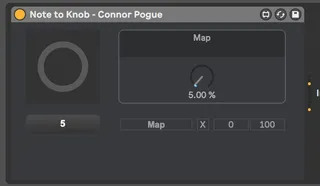
This is a relatively simple device. it takes midi note data and correlates it to the parameters on knobs.
So C-2 will equal 0 and G8 will equal 127 on the knob you want to map it to.
I did this device kinda quick so let me know if there are any glitches
Comments (8)
Yes its suppose to act just like the map8 device but it takes midi input and changes the knob according to that.
located in the API folder. should work for everyone who has max