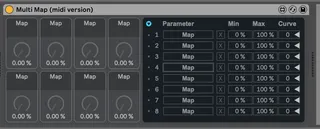
Multi Map midi version
its the Multi Map m4l but a midi device instead of an audio ...
- Type
- MIDI Effect
- Author
- connorpogue
- Version
- 1.0
- License
- None
- Live version
- 10.1.18
- Max version
- 8.1.5
- Downloads
- 808
- Updated
- No Updates
Multi Map midi version is a MIDI Effect for Ableton Live by connorpogue, distributed as freeware, with no license specified by the author. It targets Live 10.1.18 and Max 8.1.5. On maxforlive.com it has 808 downloads. Published 2021-11-12. 6 user comments below.
New to Max for Live? Read what MIDI Effects do, how device licenses work, how to install a device.
Description
its the Multi Map m4l but a midi device instead of an audio device
Comments (6)
1. open the device you want to convert in max.
2. select all and copy to clipboard
3. in Live, under Max For Live in the bowser, put a new "Max Midi Effect" on a midi track.
4. open it in Max and paste the contents of the device you wanted to convert.
5. find the "plugin & plugout commands and delete them.
6. hit CMD + shift + I and find "open on presentation. Make sure that is on
7. save the new midi device.
Hope this helps!
I would love to use this device for Live 11 too. But I have never used Max alone, and I couldn't get past step 5. Any chance you can repost a version for 11?
thanks!
It should work fine with Live 11, but you may need to make sure that the patch can find some necessary files like a bpatcher and some javascripts and svg files.
Suggestion:
Get the Max for Live Essentials pack.
Open the demo set Map8 DEMO.
Try edit the Map8 device.
set up your Max search path in "Options - File Preferences":
- add a path to C:\Users\USERNAME\Documents\Max 8\Max for Live Devices. Select "Subfolders" (Windows path)
Open this patch for editing. Check the console for hints of any errors
This device is distributed unfreezed, which causes dependencies to not be included.