- Type
- Audio Effect
- Author
- Robrecht
- Version
- 1.0.1
- License
- None
- Live version
- 10.1.18
- Max version
- 8.1.5
- Downloads
- 218
- Updated
- 2021-03-30
MuteGroups is an Audio Effect for Ableton Live by Robrecht, distributed as freeware, with no license specified by the author. It targets Live 10.1.18 and Max 8.1.5. On maxforlive.com it has 218 downloads. Published 2021-03-30. 3 user comments below.
New to Max for Live? Read what Audio Effects do, how device licenses work, how to install a device.
Description
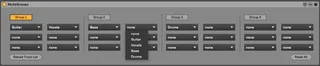
MuteGroups does what it says on the tin: it allows you to define four groups of up to six tracks each, to be muted with a single button.
Each group is made up of six drop-down menus, each containing the entire track list of the project. Just select any tracks you want to make part of the group. The contents of the menus and the selected tracks for each group are restored upon loading the project, so it should be a set-and-forget tool.
It's by no means perfect; for instance, if a track is created or removed, you'll typically want to check your groups, as some tracks may have shifted (track 5 will no longer refer to the same track if you've inserted or removed a track before it). But, well, I find it useful and so may you.
Comments (3)
I made this for my band so we could use the demo recordings of our songs as backing tracks for rehearsals, and mute or unmute the appropriate pre-recorded parts for each band member present.
For instance, if I play along live, I'll want to mute the recorded versions of everything I add to the song. However, these tracks will typically be scattered throughout a complex recording project (different vocal tracks, rhythm guitar, lead guitar...), and it's a bit of a hassle to go looking for them and mute them one by one every time, especially since our contributions differ from song to song. Plus, it's easy to forget which ones to unmute again afterwards.
With MuteGroups, I can pre-define groups of tracks to be muted for each one of us (we're a foursome) per project and just click the appropriate button when a band member joins the session.
Do you think it might be possible to modify it to fetch the absolute track ids rather than their position in the window? I change my track lineup quite a bit and I don't want to have to re-do the whole thing every time.
Thanks!