UEQ-1 Touchpad DJ Tool
version: 1.0 Release date: 2021.03.25. Device format: ...
- Type
- Audio Effect
- Author
- NoraPatches
- Version
- 1.0
- License
- Commercial
- Live version
- 10.1
- Max version
- 8.1.5
- Downloads
- 0
- Updated
- 2022-01-19
UEQ-1 Touchpad DJ Tool is an Audio Effect for Ableton Live by NoraPatches, distributed as a commercial (paid) device. It targets Live 10.1 and Max 8.1.5. First published 2021-03-25, last updated 2022-01-19.
New to Max for Live? Read what Audio Effects do, what the Commercial license means, how to install a device.
Description
version: 1.0
Release date: 2021.03.25.
Device format: Max4Live audio Device (.amxd)
Release name and format: Touchpad DJ.amxd
Number of files: 1
We've all been there - on stage performing a DJ set from our carefully composed and selected beats and applying some EQ and effects, when it happens; the MIDI controller gives it up and we'd have to restart Live.
Of course that can never be an option, but worry not, Touchpad DJ's got you covered!
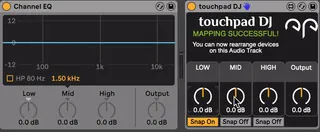
This Max4Live device automatically maps itself to "Channel EQ" and you can toggle SNAP with the click of a button. Snap will reset the knob to zero in 20 ms after you release it. The device works with a touchpad on your laptop or with a mouse. Save your gig with not having to stop the ongoing set, but still EQ precisely without a need for MIDI controller.
All GUI elements are MIDI mappable.
How to use:
------------
1. Place "Channel EQ" to be the first device on your audio track
2. Place "Touchpad DJ.amxd" anywhere on this audio track
It'll hard-map itself to the first device on the track - Channel EQ
3. Now you can rearrange the order of applied devices in any way you want!
------------
In case you place "Touchpad DJ.amxd" on an empty audio track, or if it is the first device on an audio track, it'll disable itself and display a pop-up error window for 5 seconds.
If this happens, delete the device you placed and follow the instructions you were given in pop-up.