SonicScoop
Inject your sounds in this plugin and carve the fussy freque...
- Type
- Audio Effect
- Author
- redmattre
- Version
- 1.0
- License
- None
- Live version
- 10.1.18
- Max version
- 8.0.5
- Downloads
- 0
- Updated
- 2021-07-06
SonicScoop is an Audio Effect for Ableton Live by redmattre, distributed as freeware, with no license specified by the author. It targets Live 10.1.18 and Max 8.0.5. Published 2021-07-06. 13 user comments below.
New to Max for Live? Read what Audio Effects do, how device licenses work, how to install a device.
Description
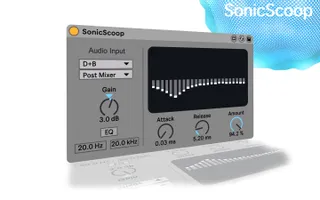
Inject your sounds in this plugin and carve the fussy frequencies out of your mix.
This is not a multiband compressor but a 24 band EQ that analyses the spectrum of the sidechain signal and applies a reversed dynamic EQ curve to another track, with zero latency.
SonicScoop is an Ableton Live only plugin, it is done with Max MSP. If you don't want this shiny, minimal, more functional and optimized version (yes, I spent hours trying to make your CPU load lower) you can download the beta version for free on gumroad, here in my profile.
improvements since last version:
- Cleaner interface and less horizontal space occupied
- Attack and Decay global controls
- The whole plugin has been re-coded from the ground up to get an optimized CPU load (from 12-14% to 6-7%)*
- Unified "Amount" control (no more Q and Effectivness) with broad excursion (from tiny corrections to large db holes)
- Extended range for the sidechain input filters
- Bug fix: you can now put more than one instances of the plugin in your project and they won't conflict
improvements that will be made if more than 10 people buy this plugin:
- Mid/Side listening engine add-on (it can considerably lower the CPU tax)
- Further optimization (some computation can be done in lower level language)
- Ability to shut down the filters in the listening engine (kind of the filters that are already in the plugin but more surgical as an effect)
- Added control to slide the frequency values of the filters (they now have fixed harmonic distance) to increase the detail of your intervention. (This may be set with a root note as a foundamental instead of a number in Hz, or maybe you can choose between these two)
have phun, for bug report email me.
*values calculated with 512 samples as buffer size (standard ableton buffer size) in a MacBook Pro 15 (2013) with an intel i7 and 8gb of RAM (the CPU counter inside max editor reports 5.75% CPU load)
Comments (13)
Just to let you know that the device crashes Live if you try to select a very large Drum Rack (probably too if it's a huge instrument rack) with lot of chains...
This isn't due to SonicScoop but it's a Live/Max bug, i.e I can reproduce with any other devices that use the BrowseRouting abstraction.
I suspect this is because, or at least related to, large racks mean a lot of chains to populate in the live.menu.
I've just sent a report to Ableton.
So, don't blame Redmattre!
@karpermusictrick I have not tried SonicScoop on Live 11 yet, I’ll let you know as soon as possible and if it works I will change the compatibility in the info of the device!
I hope you'll implement those ideas you mentioned!
There's a few tweaks that the current version need imo, but let's talk about it later when my hangover will be... over.
Thanks for your time in advance!
https://forms.gle/VVPHqm6Aoz6bVZVk9