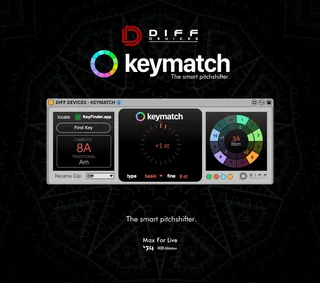
DIFF Devices - KEYMATCH
DIFF DEVICES - KEYMATCH Keymatch is a key detection t...
- Type
- Audio Effect
- Author
- DiffDevices
- Version
- 1.0
- License
- None
- Live version
- 10.1.18
- Max version
- 8.1.5
- Downloads
- 0
- Updated
- 2024-05-17
DIFF Devices - KEYMATCH is an Audio Effect for Ableton Live by DiffDevices, distributed as freeware, with no license specified by the author. It targets Live 10.1.18 and Max 8.1.5. First published 2021-07-05, last updated 2024-05-17. 7 user comments below.
New to Max for Live? Read what Audio Effects do, how device licenses work, how to install a device.
Description
DIFF DEVICES - KEYMATCH
Keymatch is a key detection tool with a built in pitchshifter.
For DJ’s and Producers interested in harmonic and tonal mixing.
FEATURES:
• Key detection Tool (Keyfinder.app*)
• Pitchshifter with 4 quality alternatives
• Target notes regarding pitch
• 4 Themes
Keyfinder.app*
Is an open source key detection tool, for DJs interested in harmonic and tonal mixing. It's intended to be very focused: no library management, no track suggestions, no media player. Just a fast, efficient workflow tool. It supports a huge range of codecs thanks to LibAV, and writes to metadata tags using TagLib.
The accuracy of the algorithm is pretty good. Here's a comparison with some other packages. I don't claim that KeyFinder is better than other key estimation software, but it shows that the algorithm is in the same league as even the best paid alternatives.
I originally developed KeyFinder in 2011 as part of my MSc in Computer Science. The algorithms, design and implementation are described in some detail in my project report, which you can download, though it's a bit heavy going.
More info :
http://www.ibrahimshaath.co.uk/keyfinder/
—
INSTALATION GUIDE:
1. Install Keyfinder.app in any location on your computer.
2. You can keep it closed the keyfinder.app.
3. Open ableton.
4. Drag and drop to the track that you want to find the key.
5. Press locate on KEYMATCH, and search for the Keyfinder.app.
6. Be sure that on KEYMATCH, the keyfinder.app is green.
7. Be aware that takes a few seconds to analyse the track, loops, or anything you want. (time depends on track size).
8. Now you can see the pitch and modifing it. On the right side of KEYMATCH you see the result when you modify the pitch knob on the centre.
To fit perfectly with Keymatch.
1. Go to the preferences of keyfinder.app
2. Select custom keys.
3. Add the keys below.
A - 11B
Bb - 6B
B - 1B
C - 8B
Db - 3B
D - 10B
Eb - 5B
E - 12B
F - 7B
Gb - 2B
G - 9B
Ab - 4B
Am - 8A
Bbm - 3A
Bm - 10A
Cm - 5A
Dbm - 12A
Dm - 7A
Ebm - 2A
Em - 9A
Fm - 4A
Gbm - 11A
Gm - 6A
Abm - 1A
---
(MAC & WIN)
* It requires Keyfinder.app to be installed on your system.
* Only works in Ableton Live with Max installed.
* It Requires Ableton Live V10.1 (minimum).
Comments (7)
Will probably grab this. I read the FAQ on your site. I'm a Windows user so fingers crossed all works well. Cheers.