FPB Pop Up Piano
Pop Up Piano Version 3.1 Requires : Ableton 11 / Max for ...
- Type
- MIDI Effect
- Author
- fingerspushbuttons
- Version
- 3.4
- License
- Commercial
- Live version
- 11
- Max version
- 8.1.5
- Downloads
- 0
- Updated
- 2023-08-25
FPB Pop Up Piano is a MIDI Effect for Ableton Live by fingerspushbuttons, distributed as a commercial (paid) device. It targets Live 11 and Max 8.1.5. First published 2021-07-16, last updated 2023-08-25. 4 user comments below.
New to Max for Live? Read what MIDI Effects do, what the Commercial license means, how to install a device.
Description
Pop Up Piano Version 3.1
Requires : Ableton 11 / Max for Live 8 / Bach Externals
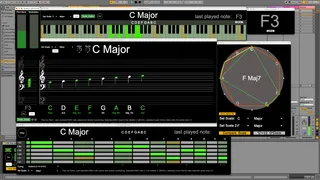
Updated for Live 11 and M series Macs Pop Up Piano 3.4 is a Max for Live device that comprises a number of floating windows that visualise MIDI input with scale guides in a manner that is useful for teaching and learning about music.
New inversion 3.4: Updated to include all of Lives native scales, Automatically links to Push selected scales, compatible with M processor Macs, improved under the hood for better processor performance
Available for free at https://fingerspushbuttons.gumroad.com/
Comments (4)
I'm assuming you want to add a touch screen.
I would guess that if you open the sub-patcher that contains the piano pop up you could possibly add the MIRA window there. Although I'm not sure, as it's a sub level interface, if it will work.
Also look at MIRA Web if it's not working that might be better supported.
let me know how you get on.