Midi CC Controller - Sustain in Midi Clips
Control and Automate most common CC Parameters and Pitch Ben...
- Type
- MIDI Effect
- Author
- GlintEye
- Version
- 1.0
- License
- None
- Live version
- 11
- Max version
- 8
- Downloads
- 1,053
- Updated
- 2021-08-08
Midi CC Controller - Sustain in Midi Clips is a MIDI Effect for Ableton Live by GlintEye, distributed as freeware, with no license specified by the author. It targets Live 11 and Max 8. On maxforlive.com it has 1,053 downloads. First published 2021-08-04, last updated 2021-08-08. 5 user comments below.
New to Max for Live? Read what MIDI Effects do, how device licenses work, how to install a device.
Description
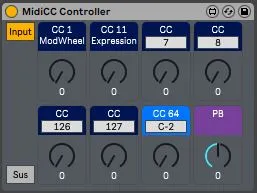
Control and Automate most common CC Parameters and Pitch Bend directly from Device View.
Automate Sustain (CC 64) directly from Device View and also as an automation lane in Arrangement View.
or...
Control Sustain Pedal Actions with a definable Midi Note (default is "C-2") directly in a midi clip. No more cumbersome Envelope editing for simple Sustain actions.
Its also possible to switch between a normal Sustain (regular CC64 message) and the sustain object from Max (doesnt send CC64 message but artificially holds back Note Off messages until knob resets to 0). Max version is helpful if some plugins don't support sustain messages properly.
Comments (5)
Hmm. If your synth is a vst plugin with parameters, that can be exposed to Live's automation than I guess you could maybe hack something together to observe parameter changes and update the control in MIdiCC Controller. But it would depend on many things. For example in a Synth like Diva if you change a preset, the whole structure of the synth could change and previously exposed parameters dont control the same thing anymore. if you have a hardware synth it would just get more complicated. Sorry i cant really help you there. but it sounds like something that you could maybe hack together yourself. these were the kind of things that started me learning max. :)
May the force be with you...