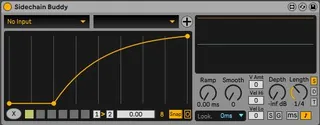
Sidechain Buddy
This is a very close Fork of Duck Buddy v0.3. So, please dir...
- Type
- Audio Effect
- Author
- GlintEye
- Version
- 1.5
- License
- AttributionShareAlike
- Live version
- 11
- Max version
- 8
- Downloads
- 1,814
- Updated
- 2022-01-08
Sidechain Buddy is an Audio Effect for Ableton Live by GlintEye, distributed as Creative Commons Attribution-ShareAlike. It targets Live 11 and Max 8. On maxforlive.com it has 1,814 downloads. First published 2021-08-04, last updated 2022-01-08. 7 user comments below.
New to Max for Live? Read what Audio Effects do, what the AttributionShareAlike license means, how to install a device.
Description
This is a very close Fork of Duck Buddy v0.3. So, please direct all your praise in this direction https://maxforlive.com/library/device/7122/duck-buddy
A big thanks to Jarlyk, Iggylabs & Slynk for this great device and for making it free!
------------------------
Update Version 1.5:
Implemented the bettered Midi Sidechain handling of Duck Buddy's newer versions.
Implemented the Pop Up Window from Duck Buddy to compare Ducking Shape with Waveforms of Sidechain and original Source. (Push the "+" Button above the Breakpoint Shape thingy)
Added "Straight, Dotted, Triplet" Toggle next to synced time selection.
------------------------
Update Version 1.1:
- breakpoints are now bigger
- "Start" and "Point" controls are now updated based on breakpoint changes by mouse
------------------------
Things i've changed:
I tweaked the Velocity tracking and added a Velocity Sensitivity slider and 2 sliders to tweak the velocity response. Now you can skew the low and high ends of received velocity values (just give it a try :P).
Changed the Preset slot behaviour. You can now save your own Presets by Shift Clicking on an empty lot. You can also morph between 2 chosen Presets.
By default i deactivated the possibility to add new points, cause i usually dont need more than 3 Points for Ducking stuff and otherwise i constantly accidentally add new points by clicking. The "Circle Button" next to "Snap" reactivates adding new Breakpoints.
By pressing the "S" (for Shape) Button, you can access mappable Knobs to control the Y value for the 1st Breakpoint, the X Value for the 2nd Breakpoint and the curvature of both. These Knobs are also exposed to the Push Parameter Banks, making quick tweaks to the Ducking shape super easy.
Thanks again to Jarlyk, Iggylabs & Slynk for this great device.
Comments (7)
Great take on the already awesome Duck Buddy ;-)
Thx :). Well i don't really know that much about the midi input setup to specify it as a Bug from M4L. I basically just extracted the objects from the demo device "midi routing input" that was released some time ago on either the cycling 74 blog or abletons hp (dont know anymore) and then i adapted it a bit to try to work around the buggy behaviour. I don't really know enough about the contents of those input routing patchers to know whether something is definitely a bug or they just messed up this one specific demo device in its midi routing capabilities. i can't really tell. but thx for the hint :)
The binding issue is actually a bug in Live itself, so we've worked around it by using some extremely hacky JS code to reestablish the links when they break. Eventually the underlying issue should be fixed in a Live patch, but who knows when that'll get released.
Also, for the person asking for Live 10 support, the problem is that binding to MIDI as 'sidechain' has unpredictable latency in Live 10; it's insufficiently precise to work for sidechaining. In Live 11, it's very tight and predictable, so it's able to work well.
Thx for the hint. Took me some time to get back to doing something on the device but i've implemented the new features from Duck Buddy.
Still my favorite Ducking tool. so thx a lot :)
I see you used UltiMap (https://maxforlive.com/library/device/3239/ultimap-modular).
Sadly I can't no longer find this device anywhere. Would you mind to share it with me?