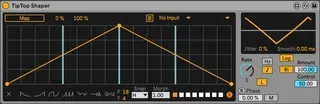
TipTop Shaper Customizable LFO
Update 1.2: - Added better Midi Sidechain handling, t...
- Type
- Audio Effect
- Author
- GlintEye
- Version
- 1.2
- License
- None
- Live version
- 11
- Max version
- 8
- Downloads
- 1,687
- Updated
- 2022-01-08
TipTop Shaper Customizable LFO is an Audio Effect for Ableton Live by GlintEye, distributed as freeware, with no license specified by the author. It targets Live 11 and Max 8. On maxforlive.com it has 1,687 downloads. First published 2021-08-04, last updated 2022-01-08. 5 user comments below.
New to Max for Live? Read what Audio Effects do, how device licenses work, how to install a device.
Description
Update 1.2:
- Added better Midi Sidechain handling, taken from "Duck Buddy"
https://maxforlive.com/library/device/7623/duck-buddy
Update 1.1.1:
- Velocity Sensitivity is now properly deactivated when switching Midi mode Off
Update Version 1.1:
-some layout changes
- breakpoints are now bigger
- controls that are not needed depending on mode are now hidden
- Velocity Sensitivity is now working properly
------------------
Based on the default Shaper device coming with Live.
Comprehensive Modulation Control
- Uni- and Bidirectional Modulation
- Modulation Smoothing
- Velocity Sensitivity
- Sync and Free Rate
Midi Control
- Activate with M Button
- Route Midi Notes from anywhere in Live directly into the device
- Retrigger LFO, 1-Shot Mode
- Velocity Sensitivity
- Ignore Note Off Events (Hold Mode)
- Include Note Off Events (Note Mode)
Preset Morphing
- Create up to 8 Presets (Shift Click on 4x2 Button Matrix) and Morph between them (works best with LFO shapes with same number of breakpoints)
Comments (5)
When i load two of them in a project and that one of them have the sidechain function the other one get triggered by the sidechain too. Any ideas why ?
:)
The morphing function is amazing, opens up a lot of cretive posibilities.
It's way better that the original device. =)
The only thing is that every time you trigger the envelope it creates an "undo" step... So if you play for a while, you can't actually undo anymore.
This is a known problem with the original device, so not your fault.
But it can be solved as this guy did: https://youtu.be/kHJ_XN3tK3Y?t=371
If that is adressed, this device would be absolutely perfect!
Thanks for the add on.
Do think it is possible to edit a little bit your shaper?
I 'd like to use it as a fade in/out fonction (with using the dummy clip)
i 'm a cellist and i dont' what to use any clic or metronom. And dummy clip launch the global play, that i don't want to.
Your Shaper works fine but in one shot mode, mapped on a utility gain button , the gain remains on "minus infiniy". Would it possible to make it return to a zero gain?
My apologies if i'm asking something out of custom, or at the wrong place,