SSAtool - session scene automator
SSAtool is a Max4Live utility device that introduces pseudo-...
- Type
- Audio Effect
- Author
- NoraPatches
- Version
- 2.0.0
- License
- None
- Live version
- 11.2.7
- Max version
- 8.5.2
- Downloads
- 0
- Updated
- 2023-01-03
SSAtool - session scene automator is an Audio Effect for Ableton Live by NoraPatches, distributed as freeware, with no license specified by the author. It targets Live 11.2.7 and Max 8.5.2. First published 2021-09-01, last updated 2023-01-03. 1 user comment below.
New to Max for Live? Read what Audio Effects do, how device licenses work, how to install a device.
Description
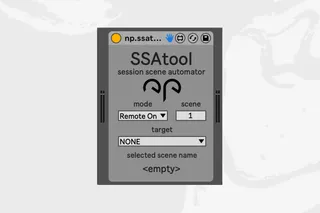
SSAtool is a Max4Live utility device that introduces pseudo-automation in the realm of Ableton Live’s Session View.
The device is FREE but donations are highly appreciated! :)
https://youtu.be/-7HnYoLchV8
Main Features:
SELECT SCENE [numberbox]
-Scene range is always equal to the number of scenes currently in the Live Set indexed from 1 to total number of Scenes
-In Live we can rearrange the order of Scenes, so in order to assist the user, SSAtool creates a comment box which displays the selected Scene’s name (if any), colour (if any) and tempo change (if any). If there’s no name provided, SSAtool displays "empty".
SELECT MODE [dropdown]
-Toggle between Remote Off/Remote On
-We can remotely turn off or turn on a device
SELECT TARGET [dropdown]
-If there are no other effects on the Track/Group, SSAtool populates the dropdown menu with “NONE” and “init” – this indicates that there are no other devices than SSAtool on given track
-If there is only 1 other device than SSAttol on the Track/Group, the dropdown menu is populated with “NONE” and the other device name
-If there are multiple other devices on the Track/Group, SSAtool populates the dropdown menu with the names of the devices in sequence as they are placed on the chain. -Replacing the order of the devices on chain re-populates the menu accordingly
SSAtool never populates the dropdown menu with an option resembling itself so the device can’t map to self by accident.
Comments (1)