- Type
- Audio Effect
- Author
- B4F
- Version
- 1.0
- License
- None
- Live version
- 11.0.6
- Max version
- 8.1.11
- Downloads
- 428
- Updated
- 2023-04-22
SmartMap is an Audio Effect for Ableton Live by B4F, distributed as freeware, with no license specified by the author. It targets Live 11.0.6 and Max 8.1.11. On maxforlive.com it has 428 downloads. First published 2021-08-26, last updated 2023-04-22. 3 user comments below.
New to Max for Live? Read what Audio Effects do, how device licenses work, how to install a device.
Description
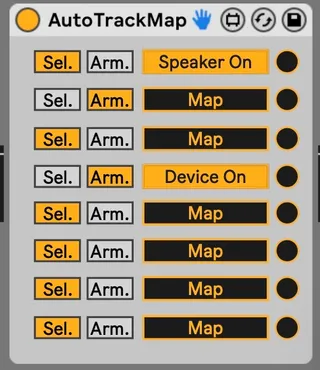
Mapping utility based on the state of the track (selected / armed) to auto turn on / off devices or racks.
Just map the "switches" and they will be turned on when the track is selected or armed ( according to your choice ).
I use it to automatically turn on the VSTs upstream of a looper and save CPU or automate audio routing to effects tracks played live on a midi controller.
Comments (3)
Just choose the trigger action (the track is selected or the track is armed) that turns the switch on. If you select another track or unarmed this track it turns it off.
there are 8 differents switches. Any switch can by mapped on any control that Ableton allows you to map, even on another track.
It work with Live 11.