- Type
- Audio Effect
- Author
- mwicat
- Version
- 0.0.4
- License
- Attribution
- Live version
- 11.0.11
- Max version
- 8.2.1
- Downloads
- 183
- Updated
- 2022-02-12
FinderPreview is an Audio Effect for Ableton Live by mwicat, distributed as Creative Commons Attribution. It targets Live 11.0.11 and Max 8.2.1. On maxforlive.com it has 183 downloads. First published 2022-02-11, last updated 2022-02-12. 9 user comments below.
New to Max for Live? Read what Audio Effects do, what the Attribution license means, how to install a device.
Description
NOTE: This device works only on MacOS operating system
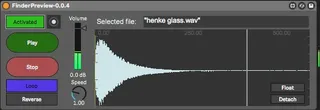
Short story: you browse some files in MacOS built-in Finder application, then you select an audio file and this device will magically know what you selected and then it will play it.
Long story: this device will periodically request the information about currently selected file in Finder application window. If the selected file is an audio file, it will try to open and play it from whatever place in the track you dropped this device.
I consider it beta state, since it is somewhat complex. It uses "shell.mxo" (https://github.com/jeremybernstein/shell) object to call "osascript" application for which it provides an AppleScript code that should return the currently selected file in the Finder application. Now, because it uses an external object and I'm not even sure if it's notarized, Catalina and above may refuse to execute it. Also, using "osascript" call may trigger a question dialog asking if you want to allow Live to use automation features... which is required for this device to work.
BECAUSE OF THE ABOVE, THE DEVICE STARTS IN "DEACTIVATED" STATE AND YOU HAVE TO ACTIVATE IT MANUALLY WITH THE TOGGLE BUTTON. If you have any doubts, I advise you to check out the patch for yourself before doing so.
CHANGELOG:
- 0.0.3 - Added reporting of playhead position, loop and reverse option, mono/stereo detection, adjustable speed setting, floating window toggle.
- 0.0.4 - Fixed playhead position correction when reverse mode is enabled, old float mode is now "detach" toggle, true float mode added as "float" toggle
Comments (9)
I usually use Audiofinder to browse my samples that way (sorted with macos tags) but your patch is even faster !
I have small improvements to suggest :
- play~ is only plugged in volume left inlet at the moment
- maybe a "grab sample" would be nice, and the ability to click on the timeline (for long samples)
- I think it would be cool if the patch opened in a new window, to see it no matter which track you are on
Thanks again !
BTW I tried to use dedicated sample management apps like Audiofinder but then I realised that my preferred workflow is to work with raw filesystem hierarchy, instead of managing dedicated library where every file is kind of "floating in the void" until I provide some filter terms. I guess that having files organised in the tree hierarchy provides better overall picture. IMO, the best combination would be to have filesystem hierarchy but with fast tag search. Finder has built-in preview but is kinda slow to work with, on the other hand the "column" view mode is really great for fast switching between different sample packs etc.
I agree with you, for me Finder is the best way I found to manage my sample library with tags and saved searches. I then use Audiofinder in "Finder mode", it's cool but kind of slow. There is also Snapper, which is very fast but a bit buggy with large lists of samples.
That's why your FinderPreview is very promising !
small things to notice :
- the floating window should stay when you change track (with "window flags float, window exec" in the bpatcher)
- no playback when I change a sample with "Reverse" on
Firstly, there are now two patchers - one in bpatcher and one in ordinary patcher coexisting. I'm not sure if this won't open a new can of worms, although I've taken some measures against it like activating monitoring from bpatcher deactivates monitoring in patcher to avoid having two PreviewFinders. :)
Secondly, floating window means that it will float on top of Live window but will disappear when focus goes to another process' window (like the Finder's one :D). This is the same issue that happens with every VST plugin in Live so I don't believe that it can be fixed. That is why I implemented both options to "detach" the device and to "float" it.
It works very well for me.