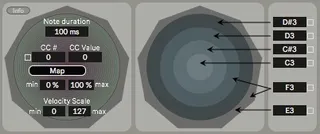
Mandala Control Center
Gives four functions to Synesthesia Corp Mandala Pads: - ...
- Type
- MIDI Effect
- Author
- karhakonhronon
- Version
- 1.2
- License
- AttributionNonCommercialShareAlike
- Live version
- 11.1.1
- Max version
- 8.2.2
- Downloads
- 155
- Updated
- 2022-06-05
Mandala Control Center is a MIDI Effect for Ableton Live by karhakonhronon, distributed as Creative Commons Attribution-NonCommercial-ShareAlike. It targets Live 11.1.1 and Max 8.2.2. On maxforlive.com it has 155 downloads. First published 2022-04-02, last updated 2022-06-05.
New to Max for Live? Read what MIDI Effects do, what the AttributionNonCommercialShareAlike license means, how to install a device.
Description
Gives four functions to Synesthesia Corp Mandala Pads:
- Set note duration
- Map CC to other devices in Live
- Scale velocity
- Set notes of strike zones
Setup:
Place Mandala Control Center on a separate track and select the Mandala Drum from the drop-down list under "MIDI From" that you want to control.
Select the Mandala Drum's assigned CC in order to map it to other objects in Live. Adjust the note duration and velocity. Select the desired output note for each strike zone.
Notes can be assigned by manually entering a note as a number (i.e 60), alphanumerically (i.e. C3), dragging the mouse, using automation, or toggling the learn button beside the note box and sending MIDI to the device.
The CC # can similarily be adjusted by manually entering a number, dragging the mouse, using automation, or toggling the learn button beside the box and playing the Mandala Pad across the surface.